JVC Everio GZ-HD40 review

Monday, December 8th, 2008

After getting a Vizio HDTV, I knew it was just a matter of time before I needed to upgrade my camcorder to HD.  My current camcorder is the old standard definition hard drive JVC.  I got one of the original models that has a plastic lens cap.

Some of the “must have” items this time around were:

  • Hard drive storage
    I’m sold on no media, computer only storage of video.
  • Integrated video light
    This is for home made Pr0n and video taping at conventions and other dark places.
  • Small in size
    So I can carry this around all the time in case something exciting happens.
  • Integrated lens cover

After looking at the Canon and Sony HD camcorders, I finally settled on another JVC Everio. This one is the GZ-HD40 shown below:

The GZ-HD40′s MSRP is $1,299 (online from $845-$1,299) and features:

  • 120GB hard drive
  • 10x optical zoom
  • 2.8″ LCD
  • HD (1920 x 1080) resolution in 16:9 aspect ratio
  • Still resolution: 2432×1368
  • AVCHD / MPEG-2 dual-format
    1 minute in MPEG-2 format is approximately 195 MB
    1 minute in AVCHD format is approximately 123 MB
  • USB, Firewire, Composite out, Component out, HDMI out
    USB, composite and component cables included
  • Microphone in, headphone out
  • LCD video light
  • MicroSD slot (card not included)
  • Micro remote control
  • Image stabilizer
  • Night recording mode

The JVC Everio is small and light (less than 1 pound) and easy to carry around in a small pouch or purse.  The LCD is a good size and relatively bright even outside.  Compared to my old Everio, the sound comes in much better, and 120GB of hard disk space is more than enough for even a fairly long trip.

If you’ve never used a hard drive based camcorder, let me tell you right now that this is the way of the future.  When SSD prices come down, that’s the next stage.  Using tape or even DVDs will soon be a thing of the past.  Why have a bunch of tapes around your house when it can be all in your computer? It’s a no-brainer.

One of the big features of this unit is the dual recording format (MPEG-2 and AVCHD).  This is one of the major reasons for selecting this unit.  Not all editing programs use the new AVCHD format but it does save some disk space.  The editing applications that come with the JVC, as well as Adobe Premiere Elements 7 allow you to edit with AVCHD format.  Some Blu-ray players (e.g. Playstation 3) can play a AVCHD disk directly without even having it converted to MPEG-2.  However, it appears that you cannot fast-forward the AVCHD disk (at least not on my Playstation 3.)

If you’re using Adobe Premiere Elements 7, when you import the AVCHD format, it will convert it to MPEG format when writing out to the DVD so you will be able to fast-forward like a normal DVD.

On a smaller note, one of the most annoying things about my old Everio was the plastic lens cover.  Thank goodness this new version comes with a built in lens cover.  It may seem trivial, but it’s was much needed and a great addition to this new version.

While on this subject, JVC also changed the way the unit turns on and off.  When you flip the LCD open, it will turn on, then when you flip it closed, it will automatically go into some type of low-power sleep mode but will turn back on very quickly when the LCD is opened again.  This is so much better than the old unit that I have where you have to use a button to turn the unit on and off.  Nice improvement.

Most of the settings are changed via the micro-joystick on the LCD flip-out and is relatively easy to use. The modes and settings are organized well and the LED light can be turned on using the joystick without having to go into any modes.

As for the “Night recording mode”, this is different from the green IR night recording that you see from Sony or other manufacturers. This mode just changes the settings for darker situations and does work.  For example, without this mode, my computer area with the lights off (using only ambient lighting), looks almost completely dark.  But with this mode turned on, you can see everything.  However, it does cause some graininess so you’ll have to weigh that versus the darkness.

Well, you know I don’t do reviews without a section of complaints.  Here they are:

Although the Camcorder itself has HDMI output, strangely, the docking station does not have one. WTF? This is very odd to me. I guess they must think that the docking station will be next to your computer and not next to your HDTV.

One very interesting feature is the ability to take still pictures WHILE you are recording video.  It’s in video resolution but it’s a nice feature.  However, you can only take 3 still pictures maximum during each video shot.  In other words, after 3 stills, you would have to stop video recording, and restart a new video segment to get 3 more stills.  I’m assuming it’s some type of RAM limitation but sometimes this limit can be a little annoying.  Of course, you can always get stills after the fact on your computer.

The built in LED light is located on the right side and can cause uneven lighting, not to mention a blue-ish tint to the image.  If you want professional looking video, this will not do.  For amateur pr0n or vacation videos, it might be okay.

Here are some more pictures of the Everio from different angles.  Click on any thumbnail to see a larger gallery version.

All in all, I’m happy with this unit, especially compared to my older JVC.  I’m completely sold on hard drive camcorders and will never buy a media camcorder again.  Compared to SD, HD images on your big HDTV looks fantastic.  However, don’t expect HD quality that you get from those $5,000 professional units.  You get what you pay for.

T-Mobile G1 first impressions

Friday, October 31st, 2008

A friend of mine got her T-Mobile G1 the first day it was available. Here she is presenting it between her boobs.  That’s how she rolls.  For the most part, she likes it but there’s some things she doesn’t like.

I played with it for a few minutes and found that I had the same problems I always seem to have with touch screens.  I don’t know if it’s something wrong with my finger or something else but I had the same problem with the iPhone as well.  The unit is a little thicker than I thought and much thicker than the iPhone.

The Android UI is not as completely intuitive as I thought it would be.  After calling her phone, I wanted to store the number into her contact list but couldn’t figure out how to do it.  Obviously, there must be a way to do it but pushing the menu button didn’t do it and I didn’t know what else to press.

My first impression of the phone hardware was so-so. I like the QWERTY keyboard but not too sure about the touch screen.  Android was a little harder to use than I thought it would be but it might be okay after you get used to it.

I’ll have to play with it more to decide if I want to go T-Mobile/Android right now.  Maybe I can talk my friend into letting me play with it while it’s between her boobs.  Or not.

Gadget tells drivers where to park

Thursday, October 23rd, 2008

Once again, it was time to visit the Westfield Century City Shopping Center to meet my friend. It hasn’t been that long since my last trip but as soon as I went into the parking lot, I noticed what appeared to be really early Christmas lights in October.

As you can see in the picture above, there are a bunch of green and red lights everywhere.  At first, I just thought it was some weird viral marketing for some movie.  Then I noticed a pattern.  Spaces that were open had green lights, and spaces with cars had red lights.

The picture below shows the lights close-up.

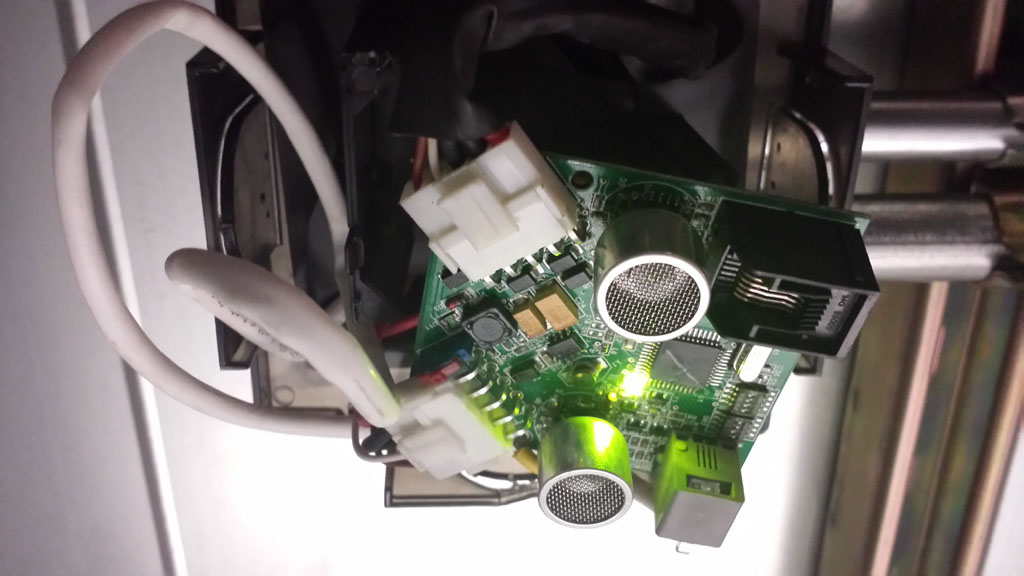
As a gadget lover, I had to get out of my car to take a closer look.  Upon closer inspection, each and every parking space has what appears to be a distance sensor that detects when a car is in the parking space.  I’m not sure what technology is being used (laser, sound, or other) but from what I could tell, it worked very nicely no matter how big or small the car was.

Frankly, from a shopper’s point of view, this is great.  As you are looking for a parking space, you can clearly see the green light which indicates there is a parking space available.  It would be difficult to install the same device in outside parking lots, but it sure seems to work great indoors.

Of course, these lights still don’t stop a-holes from taking your space before you get there.

Logitech V540 Nano Cordless Laser mouse review

Sunday, September 21st, 2008

When you have a laptop that you move around a lot, and like using a mouse (instead of the built in Touchpad) it becomes a pain to have to plug the receiver in and out of the USB port.  After a while, you can feel the USB port starting to feel like it’s getting loose.

Enter the Logitech V540 Nano cordless mouse shown below.

Close-up looks like Batman mouse

Logitech V540 Nano Close-up looks like a Batman mouse

The mouse comes in Batman black and costs $34.99 at Best Buy online ($37.88 with tax). I noticed that the price has gone up to $49.99 for some reason.  I guess I got lucky.

But I digress.

What’s cool about this mouse is what Logitech calls the “Plug-and-forget nano-receiver.”

Receiver size comparison with VX Revolution (left) V450 Nano (right)

Receiver size comparison with VX Revolution (left) V450 Nano (right)

The picture above shows the Logitech VX Revolution on the left, and the V450 nano on the right.  The VX scrolls faster and uses only one AA battery, instead of 2 for the nano (see picture below).

Battery compartment and receiver storage spot

Battery compartment and receiver storage spot in front

The VX also has a bunch of other buttons that I never use.  The manual for the Nano says that the 2 AA batteries will last 12 months.  I haven’t used it that long yet but that’s a real plus if true.  I hate having to replace batteries.  There’s also a battery low LED indicator.  That’s a nice touch.

"Nano" receiver plugged into back of Toshiba

"Nano" receiver plugged into back of Toshiba

The picture above shows how small the receiver is plugged into a USB port on my Toshiba laptop. As planned, I’ve left the receiver plugged in to my laptop with no problems.  Plug-it-and-forget-it.

Logitech claims that the 2.4GHz cordless connection is very reliable signal and to put it to the test, I connected my Toshiba’s HDMI output to my HDTV and controlled the laptop with the Nano mouse from across the room.  Everything worked as advertised.

I’ve only been using it for a few weeks but I love the plug-and-forget it reveiver.  But this tiny revceiver has made me think why the laptops don’t just come with this built into the unit.  They have the Wi-Fi built in. Why not this?  I guess there’s no good standard.  Standards are good for something.  This would be one case of that.

For me, this is a no-brainer.  Anybody with a laptop, using a wireless mouse, should get this mouse.  There’s no downside, and it works great.  I highly recommend it.

Vonage kicks my ass as a parting shot

Wednesday, September 3rd, 2008

So after weeks of waiting, my port of the Vonage number to my ooma account finally went though.  There was some type of problem verifying that I was who I said I was and I had to send them a FAX of my electricity bill, which is rediculous because with Vonage, I am able to use it anywhere I take their box.

But I digress.

So, I go online to vonage.com to close my account.  As per usual (for closing accounts at any big company), they want you to call a live person, but they are not open on weekends or holidays.  So I wait through the Labor day weekend and call them on Tuesday.  For some reason, the first 2 times I called, I got disconnected after getting to the initial person on the line who said they’d transfer me.  The first one was definitely in India somewhere.

On the 3rd call, I got an American (maybe) who did not have to transfer me.  He apologized for the slow service because the Vonage computer system was down and it was difficult for him to access my account.  As a matter of fact, I wasn’t able to log into my Vonage account before calling.  More reason to close my account.

Then the customer service rep told me that if I stayed, I could get 2 months free service. Eventually, he did close my account for me.  Finally.  But he reminded me that there is a charge to close my account.  I “forgot” to read the fine print in the Vonage contract which says they’ll charge me $39.99 to close my account.  Damn it!

If I knew they were going to offer me 2 free months, I could have called them 2 months before I switched over to ooma, and saved enough from that to cover the cost of closing my account.  Oh well.

Now, it’s going to take me 2 more extra months to break even on switching to ooma.  I sure hope ooma stays in business that long.  (Crossing fingers and knocking on wood.)

Monumental tech epic fail

Sunday, August 31st, 2008

Technology and gadgets. I love them. Recently, there was talk of software giant Microsoft buying poor Yahoo.com. Yahoo used to be the number one search engine back in the day. People used to think nobody could out-search Yahoo. How the mighty has fallen. Google has taken over as #1 and it’s not even close these days.

How did Yahoo lose such a large market share? They were #1. They started expanding to mail, games, groups, and chat.  Everything except web search.  They lost their way.  Or another way to put it is, they got lazy.  Lazy, as in slow to react.

This got me to thinking about other similar large market share losses. Speaking of Microsoft, they did the same thing to Digital Research. Digital Research had practically the entire market share of microcomputer operating systems with their CP/M.  But Bill Gates came along and bought an OS from Seattle Computing and with some modifications, sold it to IBM for their brand new microcomputer.

Today, people don’t even know what CP/M is, or was. They’ve never even heard of Digital Research and Gary Kildall. What happened there?  Missed opportunities.  Yes.  But they could have fixed that.  Did they not realize how big IBM’s computer would be in the market place?  Perhaps.  It’s pretty complicated, but I can sum it up this way. They got lazy.

Speaking of Yahoo and Google, what did people do before the Internet?  Today, if I want to buy something, a couple of clicks of my mouse and I can buy anything under the sun online. Before the Internet, people used the Yellow Pages.  Many people are too young to have even used the Yellow Pages.  It’s a big book that has the phone numbers of every business near you. It also had some ads in it too. Sort of like what Google does now, but slower, builkier, and only locally.

How did AT&T/Yellow Pages lose their entire market share?  By the time AT&T realized what the Internet could do, it was too late.  They didn’t even see it coming.  They got lazy.

While we’re on the topic of printed media, does anybody read the classified section in a newspaper anymore? Ahm. Does anybody read a printed newspaper anymore? I don’t. I get all my news online. The classified section used to be the profit center for newspapers. But these days, EBay.com and craigslist.org pretty much destroyed that market.

Why didn’t the newspapers create those websites? Same reason Yellow Pages didn’t create Google.com. They were too busy printing the next day’s newspaper and finding new advertisers.  The daily grind.  Oh, and they got lazy.

During the early days of micro computers, people used Dot matrix printers. These were printers that used print heads that moved across the paper to print by using ink ribbons. Epson, a Japanese company, ruled this market. If you wanted a printer, you bought an Epson.

Then, a instrumentation company called Hewlett-Packard or HP started selling laser printers. These printers were more expensive but made documents that looked like they came from a print shop. It was also fast. Much faster than the dot matrix.  By the time Epson realized what happened, they had lost their entire market share.

What happened to Epson? They were so busy making new dot matrix printers and improving their old models, they didn’t look at new technologies. Basically, they go lazy.

Well, I saved the best for last. During the 80′s, Sony had a product called the Walkman. It was a portable cassette player that would allow the user to play music on the go. You could listen to music while commuting, or jogging, or just hanging out. They sold tons of these things.  It was a great idea.  They owned the market that they had basically created from scratch.

Then a computer company called Apple decided to make a digital music player.  That’s right.  A computer company.  They also created a music store online on the Internet.  Even though Sony owned a record company, they didn’t figure out that Apple stole their entire market share until it was too late.

Now, Sony is scrambling to try to regain their market share.  But they’re busy with Blu-ray players, HDTVs, Playstation 3, Playstation Portable, and tons of other products.  They have so many products, they forgot about their Walkman market.  As a matter of fact, according to PC Magazine, in a list of customer satisfaction, Sony MP3 players rate #7 after Apple, Microsoft, Archos, Samsung, SanDisk, and Iriver. What a joke.

Big Sony. Are they lazy too?  You bet.

The word “lazy” doesn’t mean they weren’t working hard at all these companies.  In fact, these companies were all leaders in their markets.  I’m using the word to mean that they were sleeping on the job. They were so busy with their day to day business of making money, and cranking out new versions of their old products, they failed to see the future.  In some cases, they weren’t even looking.  Slow to react.  Lazy.

Sometimes, you have to stop what you’re doing, look up, come outside the box, and take a fresh look at things. Some people are good at this, and others are not.  Some companies are good at it.  Others, not so much.

This sort of “laziness” can happen to anyone.  Even regarding your daily life.  Personal or professional.  Are you sleep walking in your life?  Are you too busy working and paying your bills to realize you could be rich?  Are you too busy with the rat race to talk to your kids?  Or your wife?  Do you just look at today or do you look into the future?

Are you lazy?

Cheap HDMI cables from OutletPC

Sunday, August 24th, 2008

While I patiently wait for my Playstation 3 to come in the mail (hopefully by Wednesday this week), I decided to get the HDMI cable for it because I know that the PS3 doesn’t come with it.

Best Buy has the 3.3′ React HDMI cable for $59.99, or the 4′ Monster cable for $84.99 (on sale from $99.99), but I decided to order a 6′ Syba Premium Grade from OutletPC for $6.98.  Yes, $6.98.  The LD HDMI from OutletPC was on sale for $2.98 each but it’s not “premium grade,” and I like premium stuff so I opted for the more “expensive” one.

Since it’s so cheap, I decided to get 3 for $27.13 including $6.19 in shipping (and no tax).  I got 3 because my Vizio has 4 HDMI input ports and I stil have 3 left open.

HDMI 6' cable in packaging

HDMI 6' cable in packaging

One thing to notice is that I ordered the HDMI cable at the same time as my PS3 and I’ve already gotten my HDMI cable.  When OutletPC says, “Same day shipping,” they mean it.

The second my PS3 comes in the mail, I’ll hook it up using this HDMI cable and let you know if it works or not.  I hope it works or I’ll be pissed.

Best Buy stocks PS3 for a second

Wednesday, August 20th, 2008

As you may already know, I don’t have a game console after selling my PS2 when I thought I was going to buy a PS3.  After the HD format war ended, I decided to go to the PS3 instead of the Xbox 360.  But Sony announced a new 80Gig version so I waited again.

The new PS3 is coming out shortly so I checked the Best Buy website last night (8/19/2008) and saw that they had them in stock at some stores.  I was very excited and immediately ordered one online for store pickup today, and went to sleep with my PS3 dreams in mind.

When I woke up, I noticed I had voice mail messages from my Best Buy credit card company. When I called them, they told me that they called to confirm the purchases and needed them to be approved by me, but because I didn’t answer my phone, they denied the purchases.

That certainly was not good news but I told them thanks for trying to protect me from identity theft, or whatever they were trying to protect me from.  No big deal.  I’ll just re-order online.

So, like the last time, I went to the Best Buy website to re-order the PS3.  Wait.  OMG!  Now, they are out of stock at the stores and cannot be picked up at the store.  NO!!!!!  Please tell me this isn’t happening to me.

After crying on the floor in a fetal position, I decided to go ahead and order for delivery instead of store pickup.  Damn.  I was so close to picking up a unit at the store today.  But noooooo.  My credit card company wanted to protect me from myself.

Ooma sends $25 Best Buy gift card

Monday, August 18th, 2008

My previous review of Ooma noted their referral system so I tried it out with a friend of mine.  I got a return email right away after submitting my info, and within days, I got a certified mail with my $25 Best Buy gift card as show below.

They took the time to use a form filling program to automatically put my name onto the letter they sent me.  That’s a nice little touch.  A lot better than some companies that send you letters that start with “Dir Sir or Madam:”

Now the only thing I have to figure out is what to buy with my gift card. :)

Bluetrek Hands-free review Part 2

Friday, August 8th, 2008

As you may read previously, my attempt at going hands-free using the Motorola T505 was a failure.  At my friend’s suggestion, I decided to go to the Bluetrek website to see what they had there.

They have a ton of bluetooth headsets, but they also have 2 car kits.  One has a head-set plus car kit, and the other is just the car kit.  The unit I got is called the Bluetrek Car Kit Suface Sound Compact, and is shown below.  The MSRP is about $100 but I got mine online from Expansys where it’s currently selling for $54.  You can also get this device at the Apple store.

Front

Front showing the flat surface speaker

As you can see, the entire flat surface is the speaker.  It’s very interesting technology, but it doesn’t seem to make the sound any louder than the tiny speaker that was in the Motorola unit.

After unboxing and charging the battery, pairing the unit with my LG EnV2 cell phone was a breeze, and didn’t even require typing in any passwords or anything.

Back of unit showing the clip for the visor

Back of unit showing the clip for the visor

The picture above shows the back of the unit and the clip that is used to install the unit to the car visor.  As you can see, there’s not much except for the large flat surface for the speaker on the other side.

The microphone is located on a “stick” shown on the left in the picture above.  By lifting the “stick”, you move the microphone closer to you, and at the same time, this turns the device on.  It might also contain an antenna for the bluetooth but that’s just speculation on my part.  From what I’ve seen with bluetooth headsets, there doesn’t seem to be a need for any antennas.

Buttons on side for on/off and volume

Angle showing the buttons on the side

In the photo above, you can see the buttons on the right side of the unit more closely, with the microphone “stick” in the up (or on) position.  The top buttons are for volume up and down.  The bottom button is for “talk” and “mute.”  If your phone is not set to auto-answer, you push the talk button to pick up the call.  I have mine set to auto-answer so the call just comes through to the speaker phone so I don’t have to push any buttons.

The LED near the left bottom of the picture is an indicator light for power.

Installed on car visor

Installed on car visor

The device comes with a car charger that plugs into the cigarette lighter socket of your car for charging.  This same cable unplugs from the car charger and can plug into an USB device for charging via laptop or similar devices.

Unlike the Motorola, I didn’t have any problems with buzzing or strange background noise with this device. The speaker is loud and clear.  At first, I had some problems adjusting the microphone but I figured out that the best position is to have the microphone stick parallel to your face instead of having the end pointing to your mouth.  After this adjustment, the outgoing sound was clear and loud enough for people to hear me.

When you turn on the device via the microphone stick, the unit with flash and make a repeated beeping sound to indicate that it’s pairing automatically with your cell phone.  I like this a lot better than the Motorola which required you to push the “On” button for 3 seconds, then wait more time for it to pair.

The only thing that is a little bothersome is the microphone stick itself.  On two occasions, when I was moving around in the car, I hit my head on the stick.  It didn’t hurt or anything, but it’s a little annoying.  It’s not a big deal but something that I thought I should mention.

Otherwise, I’ve been happy with this device, and now I am fully hands-free and legal on the streets of Los Angeles.