Best Buy stocks PS3 for a second

Wednesday, August 20th, 2008

As you may already know, I don’t have a game console after selling my PS2 when I thought I was going to buy a PS3.  After the HD format war ended, I decided to go to the PS3 instead of the Xbox 360.  But Sony announced a new 80Gig version so I waited again.

The new PS3 is coming out shortly so I checked the Best Buy website last night (8/19/2008) and saw that they had them in stock at some stores.  I was very excited and immediately ordered one online for store pickup today, and went to sleep with my PS3 dreams in mind.

When I woke up, I noticed I had voice mail messages from my Best Buy credit card company. When I called them, they told me that they called to confirm the purchases and needed them to be approved by me, but because I didn’t answer my phone, they denied the purchases.

That certainly was not good news but I told them thanks for trying to protect me from identity theft, or whatever they were trying to protect me from.  No big deal.  I’ll just re-order online.

So, like the last time, I went to the Best Buy website to re-order the PS3.  Wait.  OMG!  Now, they are out of stock at the stores and cannot be picked up at the store.  NO!!!!!  Please tell me this isn’t happening to me.

After crying on the floor in a fetal position, I decided to go ahead and order for delivery instead of store pickup.  Damn.  I was so close to picking up a unit at the store today.  But noooooo.  My credit card company wanted to protect me from myself.

Ooma sends $25 Best Buy gift card

Monday, August 18th, 2008

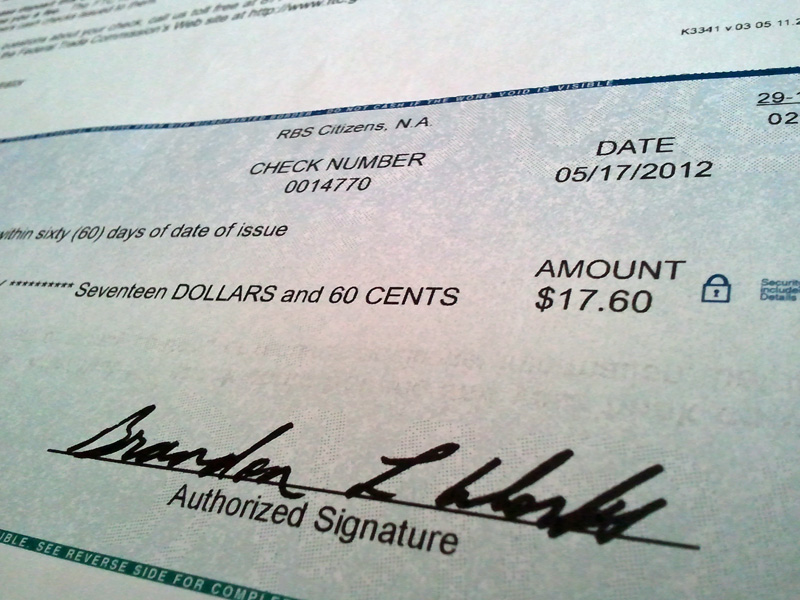
My previous review of Ooma noted their referral system so I tried it out with a friend of mine.  I got a return email right away after submitting my info, and within days, I got a certified mail with my $25 Best Buy gift card as show below.

They took the time to use a form filling program to automatically put my name onto the letter they sent me.  That’s a nice little touch.  A lot better than some companies that send you letters that start with “Dir Sir or Madam:”

Now the only thing I have to figure out is what to buy with my gift card. :)

Bluetrek Hands-free review Part 2

Friday, August 8th, 2008

As you may read previously, my attempt at going hands-free using the Motorola T505 was a failure.  At my friend’s suggestion, I decided to go to the Bluetrek website to see what they had there.

They have a ton of bluetooth headsets, but they also have 2 car kits.  One has a head-set plus car kit, and the other is just the car kit.  The unit I got is called the Bluetrek Car Kit Suface Sound Compact, and is shown below.  The MSRP is about $100 but I got mine online from Expansys where it’s currently selling for $54.  You can also get this device at the Apple store.

Front

Front showing the flat surface speaker

As you can see, the entire flat surface is the speaker.  It’s very interesting technology, but it doesn’t seem to make the sound any louder than the tiny speaker that was in the Motorola unit.

After unboxing and charging the battery, pairing the unit with my LG EnV2 cell phone was a breeze, and didn’t even require typing in any passwords or anything.

Back of unit showing the clip for the visor

Back of unit showing the clip for the visor

The picture above shows the back of the unit and the clip that is used to install the unit to the car visor.  As you can see, there’s not much except for the large flat surface for the speaker on the other side.

The microphone is located on a “stick” shown on the left in the picture above.  By lifting the “stick”, you move the microphone closer to you, and at the same time, this turns the device on.  It might also contain an antenna for the bluetooth but that’s just speculation on my part.  From what I’ve seen with bluetooth headsets, there doesn’t seem to be a need for any antennas.

Buttons on side for on/off and volume

Angle showing the buttons on the side

In the photo above, you can see the buttons on the right side of the unit more closely, with the microphone “stick” in the up (or on) position.  The top buttons are for volume up and down.  The bottom button is for “talk” and “mute.”  If your phone is not set to auto-answer, you push the talk button to pick up the call.  I have mine set to auto-answer so the call just comes through to the speaker phone so I don’t have to push any buttons.

The LED near the left bottom of the picture is an indicator light for power.

Installed on car visor

Installed on car visor

The device comes with a car charger that plugs into the cigarette lighter socket of your car for charging.  This same cable unplugs from the car charger and can plug into an USB device for charging via laptop or similar devices.

Unlike the Motorola, I didn’t have any problems with buzzing or strange background noise with this device. The speaker is loud and clear.  At first, I had some problems adjusting the microphone but I figured out that the best position is to have the microphone stick parallel to your face instead of having the end pointing to your mouth.  After this adjustment, the outgoing sound was clear and loud enough for people to hear me.

When you turn on the device via the microphone stick, the unit with flash and make a repeated beeping sound to indicate that it’s pairing automatically with your cell phone.  I like this a lot better than the Motorola which required you to push the “On” button for 3 seconds, then wait more time for it to pair.

The only thing that is a little bothersome is the microphone stick itself.  On two occasions, when I was moving around in the car, I hit my head on the stick.  It didn’t hurt or anything, but it’s a little annoying.  It’s not a big deal but something that I thought I should mention.

Otherwise, I’ve been happy with this device, and now I am fully hands-free and legal on the streets of Los Angeles.

Review of Ooma VOIP with no monthly fees

Wednesday, July 30th, 2008

Ooma is a VOIP company that went online in 2007 and I wrote about it a year ago but didn’t feel it was cost effective at the time.

Well, a few things have changed in a year.  They’ve lowered their price from $400 to $249 (including a Scout worth $60 separately) and now are selling them on Amazon and Best Buy (in Los Angeles only).

Ooma Hub - Front

Ooma Hub - Front

A little background check on Ooma shows they formed in 2005, is located in Palo Alto and had an initial funding of $26M. I’m hoping that’s enough money for them to stay in business for more than one year, which is how long it will take for me to break even, after switching from Vonage.

I visited my local Best Buy and picked up the black Ooma box and took it home.  Regardless of anything else, these guys know how to make things look sexy to a gadget loving geek like me.  Everything looked great, starting from the quick install book, to the design of the Hub, and even the packaging.  Nice.

Unlike Vonage that gives you a black box that basically looks like a small cable modem, Ooma gives you what they call a Ooma Hub, which looks and works like an answering machine.

Ooma Hub - Back

Ooma Hub - Back showing connections

The quick install instructions show how to connect Ooma with a cable modem, or DSL setup. The box even comes with the cables and adapters you need, depending on what type of setup you have.  I followed the instructions for connecting my cable modem to the hub and activated my account online.

One thing to note here is, you must decide during activation if you want to move your existing phone number over to ooma.  If you currently use a land-line, this decision must be made before you can complete your activation and will cost $40.  If you are with another VOIP (like Vonage), you don’t have to decide until later, but it will still cost $40 either way.

The Scout is another smaller box that allows you to hookup another phone in a separate room.  Although, in theory, you can do this with Vonage, Ooma gives you everything you need to make this work easily.

After everything was connected, I picked up my Panasonic cordless and got my ooma dial-tone.  Nice.

Time to do some testing by calling some people.  My initial reaction was that the voice quality was good, but not as good as Vonage.  There was nothing specifically wrong, but I think there’s a slight difference in quality the same way that sometimes cell phone calls sound a little lower in quality during a call.

One small annoyance is when your call goes through, you hear the ooma “music” which can sometimes drown out the receiver’s voice.  I read on the forum that you can ask for this to be turned off, but frankly, they should just get rid of this “feauture” because I doubt anybody wants it or likes it.

What I really liked is the way the hub works exactly like a regular answering machine.  When a call comes in, the line 1 indicator lights up red, then you’ll hear the caller, then when they leave a message, the message light comes on.  When you get home, you push the play button and listen to your messages.  You push the “trash” button to delete the message.  If you know anybody that doesn’t like voicemail because of the way that works, this will make them change their minds.  No more pushing “1″ to play and “3″ to delete on your phone.  Of course, you can listen to messages that way also.

My next test was to try to FAX something and this is where there was a failure.  The FAX machine would try to connect to the recieving FAX and fail.  When I did this same test with Vonage, it worked flawlessly.

After reading some forum posts, I decided to try changing the settings in the Hub.  More specifically, to change the “Quality of Service” settings.  To do that, you go to setup.ooma.com from your browser to access the ooma hub directly.  Click on “Advanced” and you’ll see the screen below.

Next to “Upstream Internet Speed,” enter your speed.  You can find out what your speed is from a website like speedtest.net.  Click “Update” to save your new settings.  After making this change, I tried the FAX again without success.

Once again, I went back to the ooma website and finally found the document describing how to send using a FAX machine.  They said to use “*99″ before the number you are dialing.  My HP printer/FAX also allows me to enter a “pause”, which I did.  This did the trick and the FAX worked properly.  Apparently, this code tells ooma to put the call in a “high quality” or digital mode.  Whatever it does, it works.

So at this point, I got everything to work the same way that I had it on my Vonage service, except no monthly fees.  Nice.

As with Vonage, you can go to the ooma website, which has a “lounge” where you can listen to your messages (instead of using the hub) and change your settings.  As with Vonage, you can have an email sent, and/or a text message sent to your cell phone when a message is left on your phone.  You can also set how many rings the caller gets before the voicemail picks up.

One thing that should be noted here is, when you activate your account, you are automatically signed up for their “Premier” service free for 60 days.  This service normally costs $13 per month.  One of the key features they give you is the ability to screen calls.  This is feature is not available on Vonage at any cost.  Like a regular answering machine, you can listen to the call, then pickup the phone if you want to take the call.  I don’t want to pay per month so I’m not going to have this service available to me after the 60 days is over. Oh well.

A feature available on Vonage is the ability to see a list of all calls (incoming and outgoing) listed in your account online.  Ooma currently does not have this feature.  So if you need this feature for some type of accounting, you should go to Vonage.

One final nit pick.  There was a minor bug with the ooma lounge and Firefox 3 in listening to your message, but this works fine with IE7.  [NOTE:  Between the time I wrote this after complaining about it on the ooma forum, and right now, this bug has already been fixed.  Wow.  That was fast.]  This shows how new this service is and probably not being used by millions of people yet.  They are still working out some kinks on the website.  However, their forum and blogs shows they are very dedicated to customer service and this gives me hope that things will be okay in the future.

Ooma also has a referral system where if your friend also buys from a Best Buy in Los Angeles, you and your friend both get a $25 Best Buy gift card.  Not bad.  I’m sure this won’t be going forever so might as well take advantage of it before it expires.

All in all, so far, my ooma has worked properly and I’m happy with the service.  Of course, the best part is no more monthly fees.  You can’t beat the price. As long as they don’t go out of business in the next year, I’m golden.  Every year after that, I’ll be saving about $250 per year.

I’m just waiting for Verizon or Time Warner Cable to call me to see if they can match the price.  What a great phone call that will be.

Salesguy: How much are you paying for phone service?
Me: Nothing.
Salesguy: Excuse me?
Me: I don’t pay anything.  It’s free.  Are you going to beat that price?
Click.  Followed by a dial-tone.

Update 6/9/2011:
I finally got that call from Time Warner Cable that I’ve been waiting 3 years for. She offered their service for $14 and asked how much Ooma was monthly. I told her it was free and of course, she said she couldn’t beat that price. She also said she was hearing more and more people saying they had Ooma. What a buzz kill for these poor cold callers. I should have recorded this conversation. Damn it.

LG Slim Portable External DVD Writer review

Saturday, July 26th, 2008

When my external CD player for my Toshiba Portege R205 laptop broke down, I had to find a replacement.  After looking around, the only other small external drive was the LG Slim Portable Double-layer DVD reader/Writer.  I found it on the Best Buy website but at the time, they only had it for store purchase only for about $120.  One thing that this unit has that my Toshiba also had, is the ability to operate just on the USB connection without a power adapter.

In the picture below, you can see that the LG is slightly larger but not by much.  The Toshiba opens on the top, whereas the LG slides out the front.  The Toshiba is slightly thinner as well.

Size comparison - Toshiba (left) LG (right)

Size comparison - Toshiba (left) LG (right)

The picture below shows a closer view of the LG writer.  If you lay it flat on your desk (as pictured), you need more room than the Toshiba unit which opens on the top.  However, the Toshiba unit was just a CD reader only.  So you get a ton more features with this LG unit, including LightScribe which “burns” the label straight onto the DVD.

Front view

Front view

The only thing strange is that according to the documentation, some USB ports do not output the proper amount of power to burn DVDs.  To get around this problem, this LG unit comes with a second special USB cable that plugs into the “power” input shown below (left).

Back view of USB power (left) and USB data (right)

Back view of USB power (left) and USB data (right)

Using this unit with the Toshiba laptop was a snap and I didn’t have to load any drivers or CDs to RIP CDs onto the hard drive.  I did’t try burning DVDs using the laptop but I did do so using my desktop and just one USB and everything worked fine.  It’s slower than my internal DVD burner but that’s to be expected.  Actually, one of my DVDs didn’t read properly on my internal drive but did read on this external LG unit.  Not sure what to make of that except that I was glad it worked.

This unit is clearly for laptop users and not desktop computers because the cable that comes with it is very short.  It’s longer than the one that came with my Toshiba CD reader, but still too short to go from the back of a desktop unit all the way around to the front.  So if you’re going to use it that way, you’d better get another USB cable.

All in all, I’m happy with my new external DVD burner.  If you want something for your laptop that you can use without a power adapter, this unit is for you.

Cracked iPhone still works. Good excuse to get 3G

Friday, July 11th, 2008

If you thought you were rough with your iPhone, take a look at my friend’s here.  She dropped it onto concrete and got a big-ass crack near the bottom, with crack lines going all the way up to near the top of the screen.  However, amazingly, the touch screen still works.  She says she’s going to use the crack as an excuse to buy the new iPhone 3G.

Downgrading to the LG EnV2

Monday, June 30th, 2008

Click on the picture above to see a gallery of pictures for the enV2

Click on the picture above to see a gallery of pictures for the enV2

After using the LG Voyager (left) for several months, I got sick of the touch screen and so I decided to “downgrade” to the LG EnV2 (right).  Basically, the EnV2 is a smaller cooler looking version of the LG EnV.  One thing that you’ll notice right off the bat is the outside screen is smaller than the EnV.  Of course, compared to the Voyager, with it’s massive touch screen of 240×400, there’s hardly a comparison.

The EnV2 external screen is a mere 164×64 but they do what they can with it.  The font size for the time is large enough, as well as the numbers as you are dialing or receiving calls.  In fact, they even show a microscopic image of the person you are receiving the call from if you have their picture stored.

The external buttons are large and easy to press.  One exception is the “2″ button which has the top cutout for the “down” button to intrude into.  On more than one occasion, I accidentally pushed the down button when I wanted the number “2″.  Otherwise, the buttons are good.

I really like the smaller size of this phone. It fits better in my pocket as well as in the pouches that I have in different places, including my laptop carrying case.

Power cable change to mini USB

However, one of the first annoying thing was they changed the power cable down to a mini USB, which is different from both the EnV and Voyager.  When I got the EnV2, I just assumed I could still use my old car charger, but it turns out that’s not the case.  Too bad the Verizon Wireless website doesn’t tell you this since they already knew what cell phone I was downgrading from.  But that would be asking too much. Besides, it’s probably a business process that’s patented by somebody else.

It’s really annoying how these companies keep changing the cables to make more money.  Okay. We understand you want to make money but can you please do it some other way?  It’s annoying enough to make you not want to get a new phone.

But I digress.

EnV2 Open

When you open the Env2, it’s basically the same as the EnV and Voyager.  The screen is 2.4 inches diagonally, which is a noticeable size bump over the 2.25 inch screen on the original enV, but slightly smaller than the Voyager.  The QVGA display supports 262,000 colors and a resolution of 320×240.

The keyboard layout is exactly the same in all units.  I like being able to type on a “real” keyboard for text messaging and emailing.  The only bad change they made was the 2 function keys at the top (above the numbers) are flush now and harder to press.  In the EnV and Voyager, they stuck out just enough to make it easier to press down.

The speakers are as loud as the Voyager and the speaker phone is good.  Unlike the Voyager, I didn’t have to turn the volume down a bit to avoid the unit from maxing out.

New option to help locate movie theaters and events

Pretty much all the functions (e.g. calculator, calender, address book, IM, email) are the same as the Voyager.  The 2 main differences are the Voyager’s web browser is good enough to actually browse real websites, whereas the one for the EnV2 is similar to the EnV and reverts to the “Mobile” version of the websites and often cannot display non-mobile websites properly.

However, there’s a newer version of the Navigator on the EnV2, which has more features than the one on the Voyager.  It could just be an upgrade that was available for the Voyager that I wasn’t aware of, but it’s got some great features.

One of the best new features is the ability to find Movie Theaters playing a specific movie.  It works really well.  With the Voyager, I used google with mostly good results but you do have to know how to use google for this purpose.  With this new Navigator, you don’t have to know any google tricks at all.

The actual navigator has been spruced up to look more 3D, and there is a traffic and weather information page as well.  So if you need a GPS navigator, this is works well enough to replace your handheld one so you can carry less stuff on the go.  If you get a call during your turn-by-turn instructions, you can accept the call, then when you end you call, it goes back to your navigation.

Unlike the Voyager, the EnV2 does not have live TV.  You can see streaming video, but not what Verizon calls V-CAST Mobile TV, which allows you to watch a limited number of live TV shows.  So if that’s important, this unit is not for you.  For me, I rarely watched that and it costs extra, so it was a waste of money.

Lastly, there is one annoying bug that lingers from both the enV and Voyager, and I wish LG would fix this problem.  When you store phone numbers in the contact list, you can select a “Group” for the contact.  For example, “Friends” or “Family” or “Co-workers.”  You can even add more groups.

The only problem is you can only place 10 people in any group.  WFT!??  In the world of cell phones with megabytes of memory available, this is a ridiculous limit that should be removed, especially since you can store up to 999 contacts.  So out of 999 people, I can only have 10 friends.  This code must have been written in the 80′s.  What a joke.  I suggest LG hire some real programmers for their next unit.

If that’s not enough, after about 300 incoming text messages, your inbox is “full” and you’ll get an error message.  Come on guys.  300 text messages?  Really?

That’s the end of my rant.

All in all, if you don’t need a full browser, or V-CAST video, but want a full keyboard for texting, this is a good unit and I will continue to use it… until something better comes along.

Surface surfaces at Rio Las Vegas

Wednesday, June 18th, 2008

While the World Series of Poker 2008 is going on at the Rio, Microsoft has put their Surface OS tables in the lounges there.  This video shows some “applications” for the Surface, iPhone-like operating system, like games and ways to pickup on the ladies, or vice versa.

Frankly, I’ve never seen attractive chicks like these playing video games, or even touching anything geeky, other than the iPhone.  Maybe the iPhone will finally bring in the good looking people into the world of gadgets and geeks.  One can dream.

Hands Free by July 1st or Jail

Saturday, June 14th, 2008

Plantronics Discovery 640

If you live in California, you should be aware that as of July 1, 2008, if you drive and talk on your cell phone without a hands-free device, you can get a ticket.  I’ve pretty much ignored this law change until recently.

Last year, I bought this Plantronics Discovery 640 from Best Buy, I think for about $80 but I’m not sure.  Assuming you know how big a casino chip is, you can see that this bluetooth cell phone headset is very small.  The sound quality from this unit is excellent.  That’s the good news.

The bad news is, the ear piece keeps coming off, and the charger plug keeps falling out during charging.  I also just didn’t like having something in my ear for a long time.  I guess I could never live in a Star Trek world where you have to have one in your ear all the time.  Actually, I see a lot of wannabe deal makers wearing these things all day, and all night.  They even wear it when they go out clubbing.  Yeah, so cool.

As the July 1st deadline comes closer, I decided I’d better get something else pronto.  So back to Best Buy I went and found this Motorola Motorokr T505 hands-free bluetooth device for about $130.

Motorola Motorokr T505

It has a rechargeable battery, a built in speaker and microphone, but can also broadcast on FM to your stereo system in your car.  In reading the reviews by people, there seemed to be some complaints about the FM signal being marginal in Los Angeles.

When I tried it out, I didn’t have any problems with the quality of the sound coming from my FM stereo.  The bluetooth setup was a snap, and pretty much everything worked as advertised… except for one small problem.  My first test call receiver told me she heard a buzzing sound in the background.  I didn’t make much of it since it could just be the connection, her cell phone, or even something in my car.  So I made another call, with the same problem.

Finally, I took the unit out of my car and made yet another call and the buzzing was still there.  It couldn’t be the connection, or my car, or all those people’s cell phones.  The only constant was my cell phone and the hands-free device.  I’m not about to change my cell phone right now so I guess I’ll have to return this unit and try to find something else.

I hope I find something before July 1st.  I don’t want to go to jail.


Smart Fortwo is small but safe

Monday, May 26th, 2008

Smart driver\'s side

In the last month or so, I’ve been seeing these almost golf cart sized “cars” on the road.  I assumed they were electric cars but didn’t know what it was.  I finally got curious enough to google it and found the company called “Smart” and their car is the “Fortwo.” [Click on the picture to see other angles of the car.]

It turns out that it’s not electric but does get good mileage.  The company is a joint Venture between Mercedes-Benz and Swatch (yes, the watch maker), and it’s been out in Europe but only recently (1/2008) in the US.  Because of the Mercedes engineering, they’ve put a lot of work into safety, including 4 standard airbags (2 front, 2 side).

According to the website, they have 3 models available in the US.  The basic stripped version sells for $11,590 and just comes with the naked car.  Their middle model called “Passion Coupe” sells for $13,590 and includes air conditioning, panorama roof, and power windows (and some other stuff). Their top model is their Cabriolet, and basically is their Coupe plus a soft top for $16,590.

Other interesting specs are:

  • Inline 3 cylinders (four valves per cylinder).
  • Automated manual five-speed.
  • Anti-lock brakes (ABS), front airbags, and side airbags all standard
  • Rack-and-pinion steering (optional power steering for $450).  My MG Midget was rack-and-pinion but that was back in High School. Might need power steering now.
  • 90 mph top speed (electronically max regulated). I bet you can get one of those programming boxes to remove this limit.
  • 0–60 mph acceleration in 12.8 seconds.  You’re not going to be racing anybody.
  • City/Highway mileage: 40/45 (EPA 2007); 33/41 (EPA 2008)

A lot of people are probably going to be concerned about safety so their website really has a lot dealing with this issue.  One of their big features is:

“The tridion safety cell is a “hard shell” that surrounds the smart fortwo’s occupants with an energy displacing system of longitudinal and transverse structural members. Then the engineering team added Electronic Stability Control (esp) and ABS brakes to make the smart even more technologically advanced.”

They have a video on the website showing an offset head-on collision between the Smart and a Mercedes, shown in slow motion from different angles.  The Smart’s tridion safety cell does seem to do what’s it’s supposed to do.

When I owned my MG Midget, one of the biggest problems I had was bus and truck drivers forgetting that I was in front of them at the stop light and almost rear ending me when the light went green.  However, part of that problem was how low the MG was.  The Smart car is not that low.  In fact, their seat is higher than normal, partly for higher visibility, but also for side collisions (as explained on their website).

The price seems perfect for High School and College kids and the safety features may help parents feel more comfortable with their newbie drivers going on the streets.  The middle model has a MP3 (read iPod) input for their stereo system. It’s clear that their demo-market is head-to-head against Toyota’s Scion.

It’s small, but “smart.”  If I get a chance to drive one of these, I’ll report back.