When the Little Tokyo branch of Honda Ya opened in 2007, I reviewed them out one week after their opening. Sometimes, restaurants get worse, while others get better.
The restaurant has expanded and have taken over the area to the right. So there are more table seating available. The rest of the restaurant is still pretty much the same with the Yakitori bar, Tatami (floor) seating area, and a large table for parties (or singles) in the middle of the room.
This time, instead of ordering the combo, I chose the “Izakaya” style dishes with some Oysters (see picture) which was flavorful and prepared well. I also ordered the Tororo ($2.95), which is grind Japanese yam. It’s very traditional and is rarely available at non-traditional Japanese restaurants.

Cooked Oyster - $6
Next up, I tried the White meat chicken, Asparagus, and Liver ($2) from the Yakitori bar. All were prepared as well as any Yakitori restaurant, and as you can see from the picture below, the chicken comes with some wasabi so be prepared for the extra punch.

Yakitori - $2, Asparagus - $1.80
It was a cold night so I ordered some Miso Ramen ($7.25) for my “main” dish. Again, the miso was good and the ramen noodles were cooked perfectly. Click on the thumnail below to see a larger version of the ramen dish.
The second picture below shows the prop footwear placed in front of the Tatami area to show visitors that you must take off your shoes before going in that area.
There’s also a prop kitty sleeping in that area if you look carefully.
![]() |
![]() |
![]() |
All in all, the food has improved since their grand opening and I can recommend this restaurant for anyone looking for authentic Izakaya (side dishes) prepared properly and in the traditional way. Service is good when it’s slow but I don’t know how it gets on weekend nights when it’s packed.
Honda Ya
333 South Alameda #314, Los Angeles, CA 90013
(213) 625-1184
Tuesday-Sunday: 5:30pm to 1am (last call about 12:30am)
Map

According to an article in the March issue of “Nature” magazine, researchers at the Massachusetts Institute of Technology have developed a new “beltway” for the battery material, lithium iron phosphate, that could be used to create new batteries that would charge in seconds, and hold more power in a smaller space.
This new method, if it becomes commercially available (possibly in 2-3 years), would allow cell phone batteries to be smaller and charge in 15-20 seconds, according to the article.
If this becomes reality, this would be a big breakthrough for gadgets. Laptop batteries that currently last 45 minutes would last hours. Cell phone and iPod batteries that last a day would last a week or longer.
The new Palm Pre phone slated to come out in June-July of this year has a wireless battery charger. If this technology could be combined with this new MIT battery technology, you could simply charge your cell phone at a Starbucks, while waiting for your coffee, without needing a charger or cables.
Needing to charge gadgets at home might become a thing of the past. Like casette tape, and Standard Def TV, kids in the future will be asking the question, “What’s a charger?”
Since I tried the downtown version of Zip Fusion, I decided to try their West Los Angeles branch. The West LA version is located in the Olympic Collections near the West Little Tokyo on Sawtelle. Compared to the older downtown branch, this one is in a nice clean spot and looks a lot more “fusion,” inside and out.

Bento w/ Salmon - $12.99
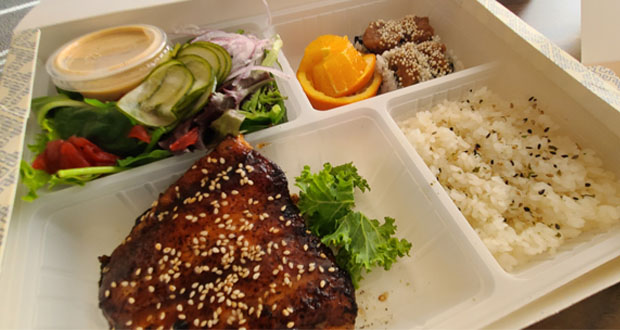
My friend ordered the Bento, with Salmon, which also comes with some Nigiri sushi and Gyoza. You get a lot of food for your money.

Nigiri sushi combo - $19.99
To compare the branches, I ordered the Nigiri sushi combo, which is what I ordered at the downtown branch on my second trip. As you can see, the layout is different and you get more Nigiri without any rolls. The rice was not as microscopic as the downtown version, but it was still smaller than normal. However, the fish was fresh and I rate it good.
As with the downtown branch, hot green tea is not free. Of course, I knew that going in this time. This is not the place for authentic old style Japaense food. Come here for some unusual sushi rolls, and Asian fusion food. For authentic Japanese food, try elsewhere.
Zip Fusion (West Los Angeles)
11301 W. Olympic Blvd #116
Los Angeles, CA 90064
(310) 575-3636
zipfusion.com
Lunch
Monday – Friday: 11:30 am – 2:30 pm
Dinner
Sunday – Wednesday: 5:00 pm – 11:30 pm
Thursday – Saturday: 5:00 pm to 1:30 am
There has already been a review of Yashima Noodle in the Olympic Collections at Sawtelle (which is apparently now closed), but none of the other restaurants in the building. Now, it’s time to checkout Kiriko, which is located on the first floor, on Sawtelle.
It’s a very small and narrow restaurant, so if you’re going to go when it’s busy, I’d suggest you make reservations. Most of the restaurant space is taken up by the long sushi bar. You can park on the street, or better yet, just park in the Olympic Collections parking lot and get validated.
The tables are very small and just barely enough space for your food. In the extreme back of the restaurant, there’s what appears to be traditional sitting areas if you want to sit on the floor, but I’m not positive it’s not just for show.
We were seated very close to the entrance and the music was a little too loud. This is caused by the speaker system setup being uneven, causing them to have to turn up the sound to make it loud enough for the entire restaurant. They need a more expensive system with multiple speakers spread out around the restaurant. Expensive restaurants usually have that down.
But I digress.

Tuna Tartar
We started the mean with some Tuna Tartar, which was on a bed of avocado and rice, prepared in a European style, rather than Japanese. For me, it was a little too oily and bland, but some people may like it.

Albacore Nigiri - $4.50
Next, I wanted to try out some Nigiri sushi, so I tried some Albacore. The ponzu was perfect, the Albacore was fresh and the nigiri was prepared well. No complaints here.

Shrimp Tempura Roll - $9
The waiter highly recommended the Shrimp Tempura roll for some reason, so I tried it and found it to be very average at best. Nothing wrong with it, just not something that should come highly recommended.
We also had their “Uni to Hotate no chawanmushi,” which is a Japanese style hot egg custard with sea urchin and scallop. The chawan-mushi is a very traditional Japanese dish and this was prepared perfectly.
We also had ice cream for desert, which doesn’t warrant any review, in my opinion.
So, the sushi is above average, and I don’t think it’s worth the somewhat higher price. I’ve had better sushi for the same or even lower price. The service was subpar, especially since we were basically the only customers there. The waiter never checked to see if we needed more green tea, and I had to ask for more myself.
All in all, if you’re in the area, you can check this place out but it’s not worth an extra trip from another area.
Kiriko
11301 Olympic Blvd #102
West Los Angeles, CA
(310) 478-7769
Map

There’s probably a book that talks about this at length, but since I don’t read, I decided I’m going to write about it.
Have you ever visited a restaurant on a Friday night and couldn’t get good service? Forget good service. You couldn’t get service, period. Even though they have a ton of waitresses, there’s so many people, they can’t get to everyone. So, you thought to yourself, “Hey, self. Let’s come here when it’s not so crowded.”
So, you return to the restaurant on a Monday at 5:30pm. This time, there’s only 3 other tables with customers, but there’s only one waitress. Guess what happens. The waitress seems to disappear after she goes to one table. When she finally reappears and takes your order, she disappears again, not to be seen for 20 minutes.
What you have experienced is what I call “Customer Service Equilibrium,” or CSE. Basically, it just means that the quality of service goes to the level required to perform the minimum required work. Therefore, when the business is super busy, the workers work quickly and hard to just barely maintain some level of customer service.
However, when it’s slow, the few workers slack off because there are less customers. They no longer rush or work hard because they don’t have to.
I’ve noticed this happening at badly managed restaurants, retail stores, bars, and even strip clubs. There’s not much the customer can do. Complaining to the waitress will just make them spit in your food.
But this CSE factor is the difference between a well run business, and one that’s probably going to fail eventually. I guess it’s like Darwinism for business.
By now, it’s old news that there are hot girls in Solid Metal Gear 4 for the Playstation 3. There’s a camera hidden behind the little girl’s desk that you can use to take pictures of these hotties. You can find detailed instructions in one of the cheat websites.
The models used for the game were Yumi Kikuchi, Scarlett Chorvat, Lyndall Jarvis and Mieko Rye. I read a rumor that they had to pose nude to be scanned for the game but that sounds like a geek’s wet dream and not reality.
In any case, enjoy the pictures.
If you have an adult website, which could include a website about condoms, or drinking alcohol, or “mature” rated video games, you really need a splash screen that tells the visitor to go away if they are under age. Of course, “adult” would also include your traditional “pr0n” website, which may contain nudity or something even “better.”
With Wordpress, this can be done via their “plugin” feature, which I’ve created for your enjoyment and downloading. This is my first “real” plugin for Wordpress so I’m not really sure I’ve done it properly but it does work on my local setup using EASYPHP, as well as hosted on a real server.
How it works:
Basically, a cookie is created when the visitor clicks on “I Agree”, and as long as this cookie is there, the splash screen will no longer appear. Once the cookie is gone, the splash screen will re-appear before the visitor is allowed to continue on to the blog. If you don’t know what a browser cookie is, read this.
To install:
First download the ZIP file onto your computer. Then, extract the zip file content and copy the directory “splashscreen” to the plugin directory located at “wp-content/plugins”. If you’ve never installed a plugin, you should probably read the Wordpress documentation here.
To use:
First, login as an administrator. Next, click on the “Plugins” menu item on the left side (v2.7+). If you installed the plugin properly, you should see “Splashscreen” listed. If you do not see it, there’s a problem with the installation. Click on “Activate” on the right side of this plugin.

Next, click on down arrow to the right of “Settings” to open up the list of options. There should be a new item there called “SplashScreen.”
If you do not see this item, return to the “Plugins” admin menu to make sure that this plugin is activated.
Now, click on “SplashScreen” and you will get the “SplashScreen Settings” page as shown below.
On this screen, click the box to the right of “Enable Splash Screen” to enable this feature.
Below this selection, make sure to select “template” for your default template. We’ll cover how to change this later. Now, click on “Update.”

At this point, you can click on “Visit site” at the upper left corner of the administration page to view your website. If you are using the default Wordpress template, you will get something that looks like the image below.

As is, if you click on “I Do Not Agree,” you’ll be taken to google.com. If you click on “I Agree,” you will be taken to your regular blog page. Using the default SplashScreen template, once you have clicked on “I Agree” once, you will not see this splash screen again until you close your browser and re-launch and re-open the website.
You can see a demo of this plugin at an adult website — alexisbreeze.com. Obviously, don’t go there if you don’t want to see pr0n. Actually, there’s just some bikini pictures there right now but if you see this post later on, there might be more.
To customize:
You can change the splash screen to your needs by copying the file “template.htm” to another name. Do not change “template.htm” so that you can use this as your backup in case you screw something up. The extension must be “.htm” for the plugin to be able to find your template and list it for selection. For example, you can copy it to “mysplash.htm”.
If you don’t know anything about HTML, you probably should not be touching the template, or just change the text only and nothing else.
The file will look like the code below.
<?php get_header(); ?>
<SCRIPT LANGUAGE="JavaScript">
<!-- hide from old browsers
function setCookie(name, value, expires, path, domain, secure) {
document.cookie = name + "=" + escape(value) +
((expires) ? "; expires=" + expires.toGMTString() : "") +
((path) ? "; path=" + path : "") +
((domain) ? "; domain=" + domain : "") +
((secure) ? "; secure" : "");
}
function setsplash() {
setCookie("splash", "1", "", "/");
}
//-->
</SCRIPT>
<div align="center">
<h3>To enter this website, you must agree to the terms below.<h3>
<table border="0" align="center">
<tr>
<td colspan="2">
<FORM>
<P><TEXTAREA NAME="comments" COLS="70" ROWS="7" READONLY>The material contained
herein is intended for mature audiences and is not suitable for persons under the age of 18. If you are under
18 or feel you would be offended by this type of material, please exit this site.
By using this website, you agree to the Terms of Service below. Please read them carefully. This Terms of
Service is a binding contract between you and this website. If you do not agree with any of these terms,
please exit this website.
TERMS OF SERVICE:
Blah Blah Blah</TEXTAREA><br />
</td>
</tr>
<tr>
<td align="left"><h2><a onclick="setsplash()" href="">I Agree</a></h2></td>
<td align="right"><h2><a href="http://google.com/">I Do Not Agree</a></h2></td>
</tr>
</table>
</div>
<?php get_footer(); ?>
Do NOT change anything above the “div” shown in yellow. You can pretty much change everything between the 2 yellow lines, except for the code that is in cyan (the light blue color). Whatever link you create to go to your blog must contain the call to the “setsplash” javascript function which sets the cookie that tells the plugin that the visitor has seen the splash screen.
For example, if you want to ask the visitor if they are “18 and over”, replace the text, “I Agree” with that text.
Also, you will have to add your own text for your “terms of service” and add it where it now says, “Blah Blah Blah.”
As is, this template will cause the splash screen to appear once until the browser is closed. Then the cookie is erased automatically and the visitor will once again see the splash screen.
However, if you want the browser to remember that the splash screen was already shown on the visitor’s computer, you can replace the “setsplash” function with the one below. By doing this, the cookie will remain even after the browser is closed. Replace the area in green highlights above with the following code.
function setsplash() {
var exp = new Date();
var expDays = 365;
exp.setTime(exp.getTime() + (expDays * 24 * 60 * 60 * 1000));
setCookie("splash", "1", exp, "/");
}
By the way, when you click on the “Update” button in the setup screen, it automatically clears the cookie so that you will be able to test the splash screen without having to manually delete the cookie or close your browser.
To download:
Download version 0.01 (beta) here.
Hopefully, there will be people that will find this plugin to be useful. If you find this plugin useful, please encourage me to do more coding by making a small donation.
Updated May 14, 2009:
Version 0.20 is released.
Updated December 3, 2009:
Version 0.30 is released.
As you may or may not know, I’ve spent the last month or so trying to convert from XP to Vista with mostly good results. One new Vista problem I’ve been having is my HP SC 2500 network printer keeps going offline and I’m not able to get it back online without deleting and re-installing it.
After reading some posts, and doing some trial and error testing, I was finally able to figure out what the problem was. Basically, the driver was hard coding the IP address in the setting and when the IP address would change, it would be “offline.”
First, bring up the “Printers” list from the control panel. Highlight the printer in question, and right-click to get the following menu shown below. Choose “Run as administrator,” then “Properties.”

The “properties” shown below is the result AFTER I fixed the problem. Above the line with the checkmark is the original PORT with the absolute IP address. This is what was originally selected. Click on the “Add Port…” button shown below.

Now, you will see the following dialog box. Select “Standard TCP/IP Port.” Click on “New Port…”

Now, you have to find out what the Port Name is for your printer. With the HP printer that I have, you push the “Setup” button, then go through the menu to find the “Network” configuration print operation. This will print out the Network settings, including the Port Name. Enter that name in the “Port Settings” as shown below. Set the “Protocol” to “Raw” and Port number to 9100, and turn on SNMP status.

That’s it! You’re done and your network printer should now be “online” properly. Why do you have to do this when it wasn’t needed in XP? That’s how Microsoft is trying to improve your experience with their new OS. Thanks Microsoft for a job well done. NOT!
You may recall that I had a heck of a time getting an adapter for my LG EnV2 from Best Buy. Well, unfortunately for me, after only 24 hours of use, the adapter started to make scratching noises. It got so bad, it became useless in just 2 uses. What a quality product.
To make sure nobody buys this piece of crap product, I’ll put it’s picture below once again. You can find it at Best Buy in the car & GPS section of the store.

Well, I still needed a working adapter so I finally broke down and checked the Radio Shack website. Unlike the prices at Fry’s or Amazon, their price was a little more at $11. That would be on the high side compared to the other places, but then it’s Radio Shack after all. That’s what they’re known for. But like 7-11, it’s really close. In fact, there are no less than 4 Radio Shacks close to me.
Upon entering the store, the lady (yes, a female clerk at Radio Shack!) walked up and I explained what I wanted. She went to the adapter section and they had everything there, including a Y adapter, 3.5mm to 2.5mm, female to female, except for what I wanted.
Interestingly, the one I wanted was placed in the cell phone area of the store, of all places. The place that I would automatically assume it should be located, is exactly where Radio Shack put it. The clerk told me that they had moved just that item over to the cell phone section recently.
These guys are a little smarter than Best Buy, that’s for sure. Maybe there’s a reason why these guys have been around so long. The item is shown below on their website.

Although this adapter isn’t as slick looking as the one from Best Buy, at least it works. So this round goes to Radio Shack of all places.
As you may know, I downgraded to the LG EnV2 because I hated the touchscreen on the Voyager. In any case, the headphone jack on the EnV2 (and probably all LG) is 2.5mm, and not the 3.5mm for normal headsets. This means that I need a 2.5mm to 3.5mm adapter to use a headset to listen to my music on the LG. I decided to take a look on Amazon to see what was available.
The list below shows what pops up on Amazon when you search for “2.5mm 3.5mm.” Some items were only $2, up to around $12, but with shipping, it would be more like $7 to $19 or so. And of course, I’d have to wait for it in the mail, which I wasn’t in any mood for.

Next, I did a search on Fry’s website and got the following list with the same search. On here, they have adapters from 99 cents up to $5. Of course, the problem with Fry’s website is that there’s no direct connection between the online items and what’s available in their stores. You can call them, but sometimes it’s very hard to find out if something is in stock at the store. There’s no Fry’s close to me so I decided to keep searching.

Next, I did the same search on Best Buy’s website and came up with the following list.

As you can see, Best Buy’s search sucks big time. It lists 4 items which have nothing to do with what I was looking for. For that matter, I couldn’t figure out how my 2.5mm search was matched with those items. If you have any online store, rule #1 is to make sure that your searches work properly so people can find what they want.
In any case, being the Internet savvy guy that I am, I googled Best Buy’s website by using the search “site:bestbuy.com 2.5mm 3.5mm” and came up with the following list:

As you can see above, the top item on google’s list is exactly what I wanted. I clicked on it and found the following item below on Best Buy’s website:

Interestingly, the item is under “Car & GPS”, then “Antennas & Adaptors.” Sure. I would have easily found this. NOT! Unfortunately, this item comes with a bunch of other adapters that I don’t really need, along with the one that I do need. But since Best Buy is close, and they do have the “pick up at store” option, I decided to go ahead and pay $15 for the conveinience.
This last decision turned out to be a big mistake.
The closest Best Buy did not have this item in stock. However, all the other ones did. So I ordered it for pickup at the second closest store in West LA. The following email came back 20 minutes later telling me the store did not have it in stock and that I would have to call their 888 number.

After going back on to the Best Buy website and figuring out that there is no way to cancel the order, or to even change it for pickup at another store, I was forced to call their toll free number. After going through their bot, the nice lady on the phone changed my order to the Culver City store, which is the 3rd closest.
After another 20 minutes, I got another email telling me the Culver City store was out of stock. OMG! Now, I’ve already spent almost an hour with this crap. I could have almost driven to Fry’s and back in that time.
Once again, I call Best Buy and this time, another nice lady answers the call but she can tell that I’m getting pretty frustrated by now. She tells me that the online inventory is separate from the in-store inventory and that she will check the in-store inventory for me. After a few clicks, she tells me that the West LA store does indeed have 6 in-store and that I can simply go to the store and pick it up. So she cancels my online order, and out the door I go.
So next time, I’m just going to call the toll free number and ask for the in-store inventory instead of using their stupid website. That’s the lesson I learned here.
I wish my story ended here but it goes on a little more. When I got to the store, I decided I wanted to test the in-store people to see how smart they were. At the entrance, the cell phone section had 3 live clerks helping people. I went to the first one and asked if they had a adapter for my LG EnV2 so I can use a headset. She told me no. So, I showed her the SKU number for the item I was looking for. She told me to ask the second guy there. So far, this is a fail.
I go up to the second guy and ask the same question. He types in the SKU number but it doesn’t come up because unknown to me, I wrote it down wrong. He does a search on the Best Buy website and comes up with the same stupid list that I got. BWAHAHA! I tell him how to use google to find it and he’s amazed how well google works.
He sees the item on his computer but can’t figure out exactly where it is. We walk to the MP3 area and it’s not there. He asks the Geek Squad guy walking by and he knows that it’s in the car adapter area. He walks me there and finds the item.
Basically, this last guy is the only person that really helped me find my item. The online store pickup, didn’t help me, except to tell me to go into the store. The first lady at the store didn’t help me. Only this last guy helped me.
Most people would have given up BEFORE the second call to Best Buy. That should be an indicator to Best Buy that something is wrong with their setup and they will soon be on their way holding hands with Circuit City if they don’t do something about it.
Dont’ say I didn’t warn you, Best Buy.