As you may have read, I purchased a new Toshiba Qosmio laptop, which came with the “dreaded” Windows Vista operating system.
The first thing I wanted to do was make my version of Vista as close to what I was used to doing on my old XP systems.
One of the things that I like to do is put WordPad in my “SendTo” folder so that I can easily open any weird file using WordPad to look at it quickly by right-clicking on an item, then using the “Send To” option.
For the life of me, I could not find the SendTo folder in Vista. After searching the “Interwebs,” I finally found out that all you have to do is type “shell:sendto” in the “Start Search” box from the Start Menu and you will get to the folder as shown below. No wonder I couldn’t find the folder.
Next, create a shortcut to WordPad on the desktop, then drag-and-drop it right into the “SendTo” folder. Now, anytime I want to open a file, I right-click, then “Send To.” Nice.

Next, I had a strange problem with my Firefox3 where every time I exited the program, my history would get erased. I looked at the Options page and found the “Always clear my private data when I close Firefox” box checked on.
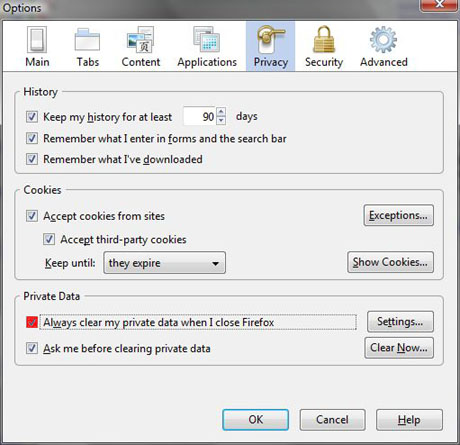
Even when I turned this option off, the next time I would use Firefox, the option was turned on again. Weird. The Toshiba came with Norton360 installed so I decided to take a look at it closer.
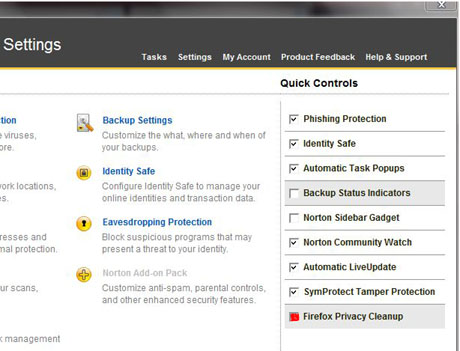
When I went to the “Setting” page in Norton360, sure enough, at the bottom right corner, there is a “Firefox Privacy Cleanup” option that was turned on by default. Huh? Why are they so paranoid about the history in Firefox over there in Norton land?
All I had to do was turn this option off, then everything was working fine.
Another step closer to making Vista like my old XP.