
If you have an adult website, which could include a website about condoms, or drinking alcohol, or “mature” rated video games, you really need a splash screen that tells the visitor to go away if they are under age. Of course, “adult” would also include your traditional “pr0n” website, which may contain nudity or something even “better.”
With Wordpress, this can be done via their “plugin” feature, which I’ve created for your enjoyment and downloading. This is my first “real” plugin for Wordpress so I’m not really sure I’ve done it properly but it does work on my local setup using EASYPHP, as well as hosted on a real server.
How it works:
Basically, a cookie is created when the visitor clicks on “I Agree”, and as long as this cookie is there, the splash screen will no longer appear. Once the cookie is gone, the splash screen will re-appear before the visitor is allowed to continue on to the blog. If you don’t know what a browser cookie is, read this.
To install:
First download the ZIP file onto your computer. Then, extract the zip file content and copy the directory “splashscreen” to the plugin directory located at “wp-content/plugins”. If you’ve never installed a plugin, you should probably read the Wordpress documentation here.
To use:
First, login as an administrator. Next, click on the “Plugins” menu item on the left side (v2.7+). If you installed the plugin properly, you should see “Splashscreen” listed. If you do not see it, there’s a problem with the installation. Click on “Activate” on the right side of this plugin.
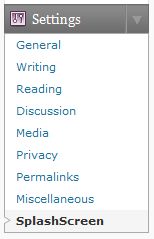
Next, click on down arrow to the right of “Settings” to open up the list of options. There should be a new item there called “SplashScreen.”
If you do not see this item, return to the “Plugins” admin menu to make sure that this plugin is activated.
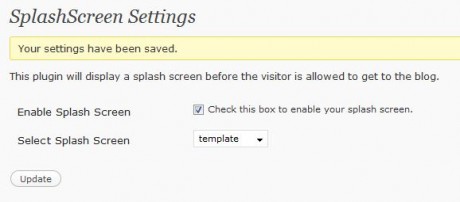
Now, click on “SplashScreen” and you will get the “SplashScreen Settings” page as shown below.
On this screen, click the box to the right of “Enable Splash Screen” to enable this feature.
Below this selection, make sure to select “template” for your default template. We’ll cover how to change this later. Now, click on “Update.”
At this point, you can click on “Visit site” at the upper left corner of the administration page to view your website. If you are using the default Wordpress template, you will get something that looks like the image below.
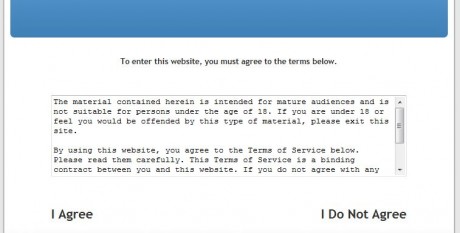
As is, if you click on “I Do Not Agree,” you’ll be taken to google.com. If you click on “I Agree,” you will be taken to your regular blog page. Using the default SplashScreen template, once you have clicked on “I Agree” once, you will not see this splash screen again until you close your browser and re-launch and re-open the website.
You can see a demo of this plugin at an adult website — alexisbreeze.com. Obviously, don’t go there if you don’t want to see pr0n. Actually, there’s just some bikini pictures there right now but if you see this post later on, there might be more.
To customize:
You can change the splash screen to your needs by copying the file “template.htm” to another name. Do not change “template.htm” so that you can use this as your backup in case you screw something up. The extension must be “.htm” for the plugin to be able to find your template and list it for selection. For example, you can copy it to “mysplash.htm”.
If you don’t know anything about HTML, you probably should not be touching the template, or just change the text only and nothing else.
The file will look like the code below.
<?php get_header(); ?>
<SCRIPT LANGUAGE="JavaScript">
   <!-- hide from old browsers
   function setCookie(name, value, expires, path, domain, secure) {
      document.cookie = name + "=" + escape(value) +
      ((expires) ? "; expires=" + expires.toGMTString() : "") +
      ((path) ? "; path=" + path : "") +
      ((domain) ? "; domain=" + domain : "") +
      ((secure) ? "; secure" : "");
   }
   function setsplash() {
      setCookie("splash", "1", "", "/");
   }
//-->
</SCRIPT>
<div align="center">
   <h3>To enter this website, you must agree to the terms below.<h3>
   <table border="0" align="center">
   <tr>
      <td colspan="2">
         <FORM>
         <P><TEXTAREA NAME="comments" COLS="70" ROWS="7" READONLY>The material contained
 herein is intended for mature audiences and is not suitable for persons under the age of 18. If you are under
 18 or feel you would be offended by this type of material, please exit this site.

By using this website, you agree to the Terms of Service below. Please read them carefully. This Terms of
 Service is a binding contract between you and this website. If you do not agree with any of these terms,
 please exit this website.

TERMS OF SERVICE:
Blah Blah Blah</TEXTAREA><br />
      </td>
   </tr>
   <tr>
      <td align="left"><h2><a onclick="setsplash()" href="">I Agree</a></h2></td>
      <td align="right"><h2><a href="http://google.com/">I Do Not Agree</a></h2></td>
   </tr>
</table>
</div>

<?php get_footer(); ?>
Do NOT change anything above the “div” shown in yellow. You can pretty much change everything between the 2 yellow lines, except for the code that is in cyan (the light blue color). Whatever link you create to go to your blog must contain the call to the “setsplash” javascript function which sets the cookie that tells the plugin that the visitor has seen the splash screen.
For example, if you want to ask the visitor if they are “18 and over”, replace the text, “I Agree” with that text.
Also, you will have to add your own text for your “terms of service” and add it where it now says, “Blah Blah Blah.”
As is, this template will cause the splash screen to appear once until the browser is closed. Then the cookie is erased automatically and the visitor will once again see the splash screen.
However, if you want the browser to remember that the splash screen was already shown on the visitor’s computer, you can replace the “setsplash” function with the one below. By doing this, the cookie will remain even after the browser is closed. Replace the area in green highlights above with the following code.
function setsplash() {
   var exp = new Date();
   var expDays = 365;
   exp.setTime(exp.getTime() + (expDays * 24 * 60 * 60 * 1000));
   setCookie("splash", "1", exp, "/");
}
By the way, when you click on the “Update” button in the setup screen, it automatically clears the cookie so that you will be able to test the splash screen without having to manually delete the cookie or close your browser.
Download version 0.01 (beta) here. [Get the latest version below]



Is it possible to have the splash screen appear only when the visitor wants to access certain pages?
Yes, I think that would be possible to add as a feature in the next version.
Is this for something like a “adults only” section that would be in a specific category?
Hi,
great plugin. Thanks !
Arnauld
Having it for certain pages or posts would be a bonus, otherwise the plugin is cool.
Keep up the good work.
“Is this for something like a “adults only” section that would be in a specific category?”
Yes, exactly. Especially for stuff on special pages. For example, if it’s blog that has fiction posted on pages, there could be some that have adult concepts and others that are free for the kids. Or think of the artists: they may have galleries on a few pages that are perfectly okay for 6 year olds to look at and then another page where they’ve got some pictures that are for adults only.
I think that would be very very useful if you could use the splashscreen in a flexible way like that! 🙂
Got it Juno. The correct way would be to be able to set specific posts as “adult” and if it comes up on ANY page (e.g. archive, search), it should bring up the splash page. I’m not positive how to do it right now, but I’ll try to figure it out.
After looking at this request for checking on a specific list of pages, it doesn’t look like it can be done without having to modify the theme you’re using because archive.php and search.php will show the content in question.
If the plugin was looking for the specific URL of the post, this would not work because if a visitor used the archive or search feature, they would be able to see the content.
If anybody can think of a way to do this without having to change the theme files, let me know and I’ll implement it.
can this plugin be modded to display a a text for a certain period than redirect the user to another page? and if he comes back with the cookie set, redirect him straight without displaying the splashscreen?
I’m not sure I understand your question. You want to “display text,” meaning text other than on the splash screen? You mean like a pop-up or do you mean text shown along with your regular home page?
Then it goes to “another page,” which I assume is a page you’ve created. For this page to set the cookie, you will have to put code in there to do so. A regular WordPress page cannot do this for you.
If that page does set the cookie, the splash screen will not show.
Where’s template.htm stored?
My bad. found it in wp-content/plugins/splashscreen/ , of course. My FTP client wasnt refreshing the server view.
Works like a charm. I desperately needed a plugin like this for about two weeks now. Tried to implement something from WordPressHero, but it was a half-baked explanation that led nowhere. Cheers, mate! You really saved my butt!
Glad the plugin did the trick for you. I’m hoping to continue to contribute more useful plugins in the future.
Could the extension of ‘htm’ be changed to ‘php’ in this line of splashscreen.php:
if( !is_dir($dir . $file) && strtolower($ext) == ‘htm’ )
Thanks,
Peter
I could (or you could), but then splashscreen.php would be included in the list of templates. I could change it to “.tpl”, or create a subdirectory with only the templates in them.
Is there a specific reason why you need this?
Yes, there is a specific reason I would like this. I have a custom splash screen page (ageverify.php) that I would like to use as the splashscreen that has some php in it: (print $domain = GetHostByName($REMOTE_ADDR);)
It’s not absolutely necessary but….
I have the ageverify.php page going to another php file also which records electronic signatures in the database. Maybe I should just something else rather than your plugin to do this?
Not sure if I’ve explained myself well enough. If not, I could email you the file so maybe you could see what I’m saying. I don’t mean to cause any undue problems or anything. Thanks for any help/advice you are able to give.
Pete
There’s a misunderstanding. Just because the template file has .htm extensions, does not mean they cannot contain PHP code in it.
In fact, the sample template.htm file contain PHP code for outputting the header and footer via WordPress. Take a look at that sample file to see how it’s being done.
Hope that helps.
love the plug-in, BUT…
it disables the RSS link for feedburner. the splash page won’t go away in order for someone to subscribe. this doesn’t make sense to me since it is not even on my domain.
So you want your RSS links to be live while the splash page is displayed? I guess this is basically the opposite request to the person that wanted only specific pages to show the splash page.
Actually, I was thinking that some pages (e.g. terms of service, copyright notice) might want to be exempt from the splash page as well.
What I need to do is to allow the admin to enter a list of pages that are exempt from the splash screen. I think this would be reasonable to implement. I’ll add this to the top of the to-do list.
even if they have clicked to enter the site and are on the main content, once they click the rss feed (using Feedburner) the splash screen comes back up.
in reality i just need a splash screen if a user is entering to the index page for the first time (or even better if they are not logged in) – like most sites.
Oh sorry, I misunderstood your 1st comment. I’m not familiar with how Feedburner works but there must be a conflict with the plug-in. If you are using a specific Feedbuner plug-in, let me know which one and I’ll have to look at their code to see what is going on.
If you wrote your own plugin, tell me which WP hook you are using, and/or cookies and I’ll try to figure out where the conflict is.
First off, thanks for this amazing plugin. It rocks!
I’m having the same issue with the RSS feeds. Because the rss reader is trying to access the feed from the site, it’s hitting the splash page and not returning the feed.
Is there a workaround for this?
thanks!
Since I don’t use a RSS reader, I’m not aware of how they work. I use “Live Bookmarks” in Firefox and that seems to work. Not sure how they do it but there must be a way to do it.
The only way I can look into this is for me to reproduce what you are doing. Which RSS reader are you using?
After a month, I finally figured out what you were talking about. I will try to have a new version out this weekend.
I’ve released version 0.20 to get around this problem. See my post:
http://cochinoman.com/2009/05/14/splashscreen-wordpress-plugin-version-020/
Great job.
But I need help lil bit. It adds cookie but I don’t want it to add cookie. I want if visitor see splash page everytime when he join my site again.
how can I do that?
ps: sorry that my english isn’t good as I would like.
keep up the good works.
The way this plugin works, the cookie is required to remember that the splash screen has been displayed.
If you mean that you want the splash screen to appear again when they return to the site, it will do so if they closed the browser because the cookie will be gone between sessions.
Hope that helps.
Thanx for reply.
Well, actually I want the splash page to appear again when they return the site without close browser. How can I do that?
I think what you want is just a “homepage” which can be done via:
Administration > Settings > Reading > Front Page Displays > Static Page
Then select the “homepage” that you want displayed.
This has nothing to do with the plugin or cookies.
Hope that’s what you wanted.
my english sucks. 🙁 dude, I want splash screen but I want when you click “Enter the site” delete cookie automaticly. Not at browser restart. Hope you understand.
Thanx again for your reply. Keep up the good works.
I’m not understanding you. If you delete the cookie, the splash screen will re-appear and you will not be able to see your blog. The cookie is what causes the splash screen to NOT appear.
Let me try to understand exactly what you want. If I go to your blog, I see the splash screen. I click on “I agree” and get to your blog. What do you want to happen at this point? You say you want the splash screen to re-appear without having to close the browser. So, I continue to navigate your blog and at what point does the splash screen re-appear again?
first, let me say – brilliant and thank you.
now, onto the small problem.
If someone logs onto “painandwonder.com” and clicks “enter” they go right in. If someone logs onto “www.painandwonder.com” and clicks “enter” they get the same splashscreen and have to click “enter” again.
Any ideas on how to get it to go right into the website no matter which “link” they go to?
Thanks for your help in advance.
To make this work, change the setsplash function in the template you are using to the one as follows:
function setsplash() {
setCookie(“splash”, “1”, “”, “/”, “.painandwonder.com”);
}
Notice that there is a period in front of the domain name. This will make the cookie work for all subdomains (including www) in most browsers. If it does not work, please let me know what browser you are using.
Work in wordpress 2.8?
I haven’t tried it with 2.8 yet.
Okay, I've now tried it with 2.8.2 and it works fine.
And how the search engines works with this plugin?
There are some restrictions?
I don’t think the search engine bots will be able to traverse through your website.
hi!
can i have a page with a flash animation as a splash page?
i’m have some problems doing that
thanks
What is the problem?
Hi, This plugin is exactly what I need, but it doesn’t seem to work under 2.8.2
I’ve installed and activated, but there’s no screen like the one above for setting the template – can I do that somehow in the code, do you think?
Thank you for your excellent work!
S
I just tried it with 2.8.2 and it works fine as far as I can tell. The settings screen is located under “Settings” in the Admin screen on the left side.
I've been experimenting with your plugin and I think it's great. I'm developing a WordPress website where I need a splash-screen to ask users to select between 2 languages. I can can get the plugin to work fine and it remembers a cookie for the first language, but then no cookie is set if someone clicks on the second language and the user sees the splascreen again – there's no way into the website.
Is it possible to get the plugin to set 2 different types of cookies, depending on which language is selected?
Sure. Try this:
<td align="left"><h2><a onclick="setsplash()" href="/lang1/">Lang 1</a></h2></td>
<td align="right"><h2><a onclick="setsplash()" href="/lang2/">Lang 2</a></h2></td>
Hope that helps.
can you use this for a specific page rather than the whole site?
Not the way it is right now. That's a feature that could be added in future versions.
great thanks!
Hi, looks cool. Question: does this block Google's search activity when they want to index a site? G.
Yes, it probably does.
How can I use this two record two different values in the cookie. For example, if they click on English (instead of I Agree) they will be redirected to "index.php/?lang=en", if they click on Spanish (instead of Do Not Agree) they will be redirected to "index.php/?lang=sp"
You can set the cookie name by changing the setcookie call. The first parameter is the name of the cookie (e..g.):
setCookie("splash1", "1", exp, "/");
setCookie("splash2", "1", exp, "/");
But doing this will not work with the plugin because you will have to change the plugin PHP code to check for 2 different cookies instead of just one.
Instead of doing it that way, I suggest you set an entirely different cookie for the language selection (e.g. "lang"). This way, you can keep the splashscreen plugin code unchanged and when you need to find out what language you are using, check your "lang" cookie instead.
Thanks for your answer…
Would it be possible to only change the value in the cookie. Than, instead of looking for two cookies, the PHP code could redirect according to the value it finds in the cookie…i.e. to link1 if value=1 or link2 if value=2 ? Do you know how we could modify the code to do so ?
I don't understand why the PHP code needs to redirect according to a cookie when the template itself can simply redirect to 2 different URL locations.
In other words, if you click on link 1, it would simple go to URL 1, and click on link 2, and it would go to URL 2. No need to check any cookies.
If you just want the value in the cookie to be different, use:
setCookie("splash", "1",exp,"/");
setCookie("splash", "2",exp,"/");
Then, later in your website, you can check for the cookie "splash" for 1 or 2.
Installed the update and cant find the SETSPLASH() function to change the cookies
function setsplash() {
var exp = new Date();
var expDays = 365;
exp.setTime(exp.getTime() + (expDays * 24 * 60 * 60 * 1000));
setCookie("splash", "1", exp, "/");
}
Perhaps the next version could have this as a setting in the options? In the meantime – what exactly do I replace with the code above?
Thanks Again! Great Plug In
The code should replace the existing setsplash function in the template. I've changed the post above so that it is now highlighted in green.
Having this setting in the plugin option is a great idea. I'll put that on my list.
It would be nice if there was a setting for only the home page, or specific pages. An include path might be more effective than an exclude path.
Also, the plugin would destroy a site's SEO. It should check for known robots agent and exempt them from the splash screen.
I guess ideally I should have an exclude path list OR an include path list (selectable) because different sites seem to need different things. I don't think that would be real hard to do. It's just that I don't need it on my site so there's no reason for me to do it.
Regarding your second idea/request, I think that's a super idea, and I need it for my own site but I don't know how to do it. Do you know where there's some documentation on this so I can learn about it and implement it? Thanks for any help. As repayment, I will put it in the plugin for everyone to use.
This blog rocks! I gotta say, that I read a lot of blogs on a daily basis and for the most part, people lack substance but, I just wanted to make a quick comment to say I'm glad I found your blog. Thanks,
A definite great read…
-Bill-Bartmann
Hi cochinoman. Thank you for this plugin. Extremely useful! I'm trying to implement it on my website, in a way it redirects the visitor to different languages (it's a bilingual site). The problem is that sometimes when I click on one of the languages, the plugin does not take me to the website, but reloads the splash screen again. Upon clicking the second time, the cookie is set and the plugin works as expected. Do you have any guidance for me in that sense?
I set this like this:
<a onclick="setsplash()" href="http://mywebsite.com/en/">Enter site »</a> | <a onclick="setsplash()" href="http://mywebsite.com/">« Entre</a>
I'm not sure but it's possible that you are going to www. mywebsite.com and mywebsite.com and the cookie does not recognize it as the same website. If that's what's happening (and I'm not positive that's true), the solution is in the following comment:
http://cochinoman.com/2009/02/16/wordpress-plugin-for-splash-screen/#comment-977
Let me know if that works or not.
I accidentally deleted your comment but recovered it. Your comment below:
—–
Hi, thank you for your quick reply.
Actually it's not www. I redirect to mysite.com and mysite.com/en/ (- for the english part). Now I try to narrow it down and it seems this behavior is limited to native IE7. Firefox, Safary, Chrome, IE8 and even IE8 in compatibility mode work just fine.
What I'v tryed so far:
1.Setting the cookie as 1 and 2 – like you suggested here: http://cochinoman.com/2009/02/16/wordpress-plugin-for-splash-screen/comment-page-2/#comment-1240
2. calling the same cookie by different functions, ie function setsplash() and function setsplashen () for the different links.
It did not work. But since it happens only in native IE7, maybe you'll have some kind of revelation.
—–
I really don't have an answer for you except that it sounds like it's a bug or incompatibility in IE7. I no longer have IE7 so I'm not able to reproduce this problem. If you figure it out, let me know.
Hi,
Two problems: first, I'm getting a bad interaction between this and the WP Supercache plugin. Users would hit "enter" and not go anywhere. I just turned Supercache off, but at some point would like to turn it back on.
Second, I have a user saying he's getting the same problem when trying to log in from a blackberry. He hits "enter" and nothing happens–he can't get in. Any ideas?
1) The only way that I can figure out how to make this plugin work with the Cache plugin would be to combine both into one plugin. If there's another way to do this, let me know and I can add it to the plugin.
2) Tell the Blackberry user to turn on his/her javascript and cookies for your website.
Is there a way to add images to the blank screen in the Splash1shot.htm? I have tried everything and somehow cannot get it to work. Thanks for your help
If you want to leave everything else as is, put your images after the <H1>…</H1> and BEFORE the <table border="0" align="center">
Are you using some type of HTML editor or doing it by hand?
Hey, let me start out like everyone and say what a great plugin this is! I can really see how it will come in handy in future projects..!
Obviously, this particular project is giving me trouble. I'm trying to make a short flash animation play as a splash page and then redirect to the wordpress homepage.
I've managed to edit a template.htm file to show me the .swf but then it does not redirect to http://www.domain.com/index.php as pointed, but rather just loops the animation over and over.
Any pointers? Another note: this was due last night. I hadn't accounted on it being so difficult to add a flash intro to a wordpress site! help!
First things first. Make sure to download the latest version 0.30 from:
http://cochinoman.com/2009/12/04/splashscreen-wordpress-plugin-version-030/
Next, do you have the flash doing the redirect? If so, this will not work. The link calls a javascript function which sets a cookie to NOT display the splash page.
hey man this is a great plugin, it was exactly what i was looking for thanks so much. but i was wondering, how do i get the splash screen to reset after the browser is closed and opened? i'm sure the code to do so is so simple sorry
Be sure to get the latest version at:
http://cochinoman.com/2009/12/04/splashscreen-wordpress-plugin-version-030/
nvm i got it lol
i'm having problems in firefox browser with the cookie not expiring so the splash page never shows up again even if i restart the browser. but it works in opera, safari, IE, and chrome. any suggestions?
I assume you're using the latest version (see link above). Are you testing with the default plugin template or did you make your own? If you made your own template, try using the default.
I've tested the default template code with Firefox 3.5.7 on Windows and it seems to work.
Yeah, I've tried all of the templates and the splash page still doesn't appear every time the browser is restarted. (Yes, I have the latest version)
Okay, sounds like you have some type of caching going on in Firefox. Did you install a caching plugin for Firefox? If so, disable it.
You can test out this theory by closing Firefox, then open to your website. If no splash page, go to a page on your website that you have never been to before. If the splash page appears, then you were looking at a cached version of your website.
Also, see if the cookie "splash" in still there after re-launching Firefox by going to Tools => Options => Privacy => Remove Individual Cookies. If it's NOT there but you see no splash page, you are looking at a cached version of your website.
Hi,
This is a very good plugin, thank you.
I have one question about using it:
What if the end user has js disabled? So he could never run the setsplash function to set the cookie and move into the site.
Meaning, anyone with JS disabled won't be able to get to the site.
More than that, what the Google's crawler will see, since as I know the cralwer is also not JS enabled.
BTW: Add a subscribe to comments, it will be much helpful.
Thanks,
Maor
If Javascript is disabled, the plugin (and many WordPress features) will not work properly.
Regarding bots and crawlers, use the newest version of this plugin located at:
http://cochinoman.com/2009/12/04/splashscreen-wordpress-plugin-version-030/
To subscribe to the comments, click on the link "Comments RSS" under Subscribe located on the right side of every page. Or you can just click here:
http://cochinoman.com/comments/feed/
Brilliant!
Hello cochinoman,
i need your help. How can i include a .swf-data? i'm to glad ;). i've create my own template. create a new folder "splash", insert the index.swf and required javascript. the path i think ist also
<embed src="/wp-content/splash/index.swf"
<script src="/wp-content/splash/AC_RunActiveContent.js"
the javascript are be found, BUT the swf aren't be play? i don't know what's wrong? the path?
After that if the flash is ok, how could i get a countdown? when the flash is over, its automatically go to the main page without a click on a button? button?
Is your template located in the same directory? If so, you don't need the full path. You should be able to just use "index.swf".
To have a timeout, use the Javascript setTimeout() function.
Ah ok. I've found my trouble. in the HTML data i've written all what Flash genetate. Correct is all between the object Tag and the correct path /wp-content/your folder/your swf
What do you meen with setTimeout()? Where mus this stand? Need i a javascriptflash .jsfl data? or…? have you an example? In javascript i'm a little newbie. i'm still learning. I just can't seem them. Let me guess. It's easier as i think 😉
https://developer.mozilla.org/en/DOM/window.setTimeout
Is it possible to make it, so that the script auto re-directs? I mean like a "auto-refresh"? Without the user having to click the link?
I haven't actually tried it but it should work. Put the auto-refresh code in the template but make sure that it sets the cookie.
I' try and try and try again and just i found all. OMFG ist's sooooo easy^^ wayne.
That's all you need
window.setTimeout("setsplash()", 13000);
13000 = 13sec, 10000 = 10sec
and than, if you want to refresh your site put this code at the beginning
@Daniel here the autorefresh. i'm search and search…
<META HTTP-EQUIV="Refresh" CONTENT="15">
15 = 15sek, 300 = 300sek
That's all! Thank you cochinoman
Hi.
I would like to know if there is a way to automatically simulate someone clicking on "I Agree".
What I am trying to achieve is a splashscreen that appears for around 10 seconds, then automatically goes to the Home Page.
I tried this code:
<meta http-equiv="refresh" content="5;url=http://www.domain.com">
But when it refreshes it just goes back to the splashscreen.
I see in the code that it has the "onclick="setsplash()" and can't figure out how to automate that.
Any suggestions would be greatly appreciated.
You need to do exactly the same thing as the guy who posted right before your post. Use:
window.setTimeout("setsplash()", 5000);
to set the cookie AFTER the splash page has been shown. This delay is needed because if you set the cookie too soon, the splash page will not appear at all.
Then your META html code in your comment will wait a few seconds, then refresh the screen. Since the cookie is now set, the splash screen will NOT appear.
Make sure that the time in the META is LONGER than the time in the setTimeout. 5000 = 5 seconds, so the META code should be "6" or to be safe, more like "10".
does not work with IE?
It should work with IE. What version and platform are you using?
How to make the web display the always splashscreen when opening the same web in a new tab or re-visit the site after closing the tab?
The instructions are right on this posting. Look under "To Customize" and you will see the code.
I like this plug-in but wanted to remove it for personal reasons. I had deactivated this plug in but it is still showing to viewers on my site. Any tips how to remove this? I have already deleted this out of the plugin folder.
It's either another plugin that is caching the page or the user's local browser cache. My guess is the former.
thanks would be great if you could ad a list of ip and urls that i aint showing (like search engings) i have a (i think) complete list of that ip and stuff if you want it for a future version just send me a mail.
i also would like to have the centerthing like 400×400 solid but rest of it 75% transparant black so i still can see "a faded" version of the site in background..
thanks
i dont even know if you see this on this inactive(?) addon, but i hope u do 🙂
Take a look at the new version at:
http://cochinoman.com/2009/12/04/splashscreen-wordpress-plugin-version-030/
Hopefully, that's what you are asking for.
I guess i should put in here somewhere?
function display_splash() {
global $splash;
$splash->getSettings();
if (($splash->allSettings['splashscreen_enable']) && (!is_admin()) && (!$splash->is_excluded_url()) && (!isset($_COOKIE["splash"]))) {
// display the splash screen
$dir = dirname(__FILE__) . '/';
@include_once($dir . $splash->allSettings['splashscreen_type']);
exit();
}
}
I have a function to call like
if (in_array($_SERVER["HTTP_USER_AGENT"], $bot)
no splash screen
else
show splashscreen
and no i havent figure out how to code addons to WP yet…
Hi There,
First thank you so very much for this, I have been trying to create a splash page for a week now and came upon your amazing plugin.
I am actually using your plugin to create a splash page to direct attention to a crowd funding campaign. I've altered the code a bit and dressed it up with graphics etc. One thing I am struggling with is that I have an image that I have put a hotspot on that says "Click here to Enter" and I entered in the URL I want people to enter on, but it does not work when I actually activate your plugin.
I noticed this code you have in the template.htm file "<td align="left"><h2><a onclick="setsplash()" href="">I Agree</a></h2></td>"
But I want my people to click on an image, and not text. Is this possible? I am using Dreamweaver and image hotspots to control click points. The actual HTM page that I created you can find here:
http://natalie-brown.com/splashnat.htm
How do I take your onclick language and put that into a hotspot so that when the hotspot is clicked it goes to the main page of the site which is a WP Static page? I hope this makes sense, if not let me know what doesn't and I'll clarify.
I'm not sure I understand your question but if you want an image instead of the text "I Agree", just replace the text with the HTML code to display the image.
If you need more help, go to my Contact page and email me.
Hi.. Just an update.
I started all over again with a second version. This time instead of it being an image the user needs to click on to enter site, I left your text link code in at the bottom <h2> <a onclick="setsplash()" href="">Click here to enter the web site</a></h2>
This does note work. For some reason when the link is clicked, it just stays on the splash screen and does not move to inside the site.
See coded .htm page here: http://www.natalie-brown.com/splashnat2.htm
Not sure why this is happening? I did add in some CSS and another DIV for the video. Could this be causing it?
I am in a bit of a bind to get this done, so not sure if you have any time to look at it as my campagin lasts only 20 more days and I wanted to use this as part of the countdown.
Thanks so much!
I think you should use the newer version of the plugin located at:
http://cochinoman.com/2009/12/04/splashscreen-wordpress-plugin-version-030/
Hi there! I am going to send you an email today as .41 does not work for me either. I have done a screen video with me taking you through what I have done and you can see my screen and hear me speak about the issue. I really appreciate your reply.
Thanks 🙂
Check your email. I think I got it working for you.
You posted a comment above. Can you give the coding for setting a cookie with lang for french? If I can see it, I think I can then copy it more.
You can set the cookie name by changing the setcookie call. The first parameter is the name of the cookie (e..g.):
setCookie("splash1", "1", exp, "/");
setCookie("splash2", "1", exp, "/");
But doing this will not work with the plugin because you will have to change the plugin PHP code to check for 2 different cookies instead of just one.
Instead of doing it that way, I suggest you set an entirely different cookie for the language selection (e.g. "lang"). This way, you can keep the splashscreen plugin code unchanged and when you need to find out what language you are using, check your "lang" cookie instead.
I tried this last year on my wordpress adult site – and there was some kind of conflict, it would work right….has any other newer version been released? or is it the same version as 10 months ago?
The current version is 0.41 located at:
http://cochinoman.com/2009/12/04/splashscreen-wordpress-plugin-version-030/
Scroll all the way down to the bottom of the post and you'll see a link to the new version.
If you tell me what problem you're having, maybe I can help you with it.
Is there a way to show the splash screen every time the a person comes to the site. Basically reject the cookie.
If you don't set the cookie, the splash screen will never go away. I'm not sure what you want to happen. The way it's setup currently, when they return to the site in another session, the splash screen will be there again.
Is development on this plugin continuing? I hope so as it is pretty neat.
I had it running pretty well and customized and everything and when I installed a new theme on the site, it went haywire. Could this be a conflict with the CSS in the theme?
There's a newer version here:
http://cochinoman.com/2009/12/04/splashscreen-wordpress-plugin-version-030/
Please see my site invertigosolutions.com.
I used SplashScreen on it and I want the splashscreen I made to show each time a user visits the homepage.
You said: I think what you want is just a “homepage” which can be done via: Administration > Settings > Reading > Front Page Displays > Static Page
Then select the “homepage” that you want displayed.
But this only allows me to pick a WordPress page to be selected which has the full template and theme I am using. I want the full black background, etc.
Can the cookie be disabled but the Splash Screen is not disabled..?
The splash screen is designed to appear on ANY page when the user first enters your website. If you only want it to appear on your homepage, you will have to figure out a way to set the cookie automatically on all pages except for the homepage. This can be done but the plugin does not support this feature at this time.
Just for your information, the new version of the plugin is available at:
http://cochinoman.com/2009/12/04/splashscreen-wordpress-plugin-version-030/
This new version does not support what you are trying to do but it has other features that is better than the old version.
Is it possible to use this plugin to show a video before entering the site?
Yes. If you have the video on a server like youtube, simply place the embed code in the template for the splashscreen.
Also, please note that there is a newer version of the plugin here:
http://cochinoman.com/2009/12/04/splashscreen-wordpress-plugin-version-030/
hi, thanks for nice plugin. can i use html / php file insted of htm template? i try but not working. can you please help me on above?
thanks in advance
Yes you can. What kind of help do you need? In case you missed it, there's a newer version at:
http://cochinoman.com/2009/12/04/splashscreen-wordpress-plugin-version-030/
Hey, thanks for all your work, this plugin is great. I do have one question though – I have flash banners on my site, and they always render above the splashscreen (except on firefox for some reason).
I've tried using z-index and different ways of embedding the flash but nothing works. Would you have any ideas?
Thanks
Nick
I've had this same problem myself and tried using z-index as well and it seemed to go away but I think it was because the offending banners were changed on their end. So, to answer your question, I was never able to definitively fix this problem.
In case you don't have the latest version, see:
http://cochinoman.com/2009/12/04/splashscreen-wordpress-plugin-version-030/
Hey, any chance I could see that site where you got the flash working? I might be able to work out how to do it by copying what you have on there :0)
alexisbreeze.com
Is it possible to include a registration/login eg wp-members on thye splash page?
You can modify the splash screen to include anything you want, including a registration/login screen.
HI .. like your plugin .. not sure if your still maintaining it .. as i have upgraded to WordPress 3.2 .. having a few issues with your plug in namely with IE & fire fox.. it seems to be stuck on splash page, each time i click enter it displays splash page again, when cache is turned on. turned off it works fine, any advise would be great
The plugin currently does not work with any cache WP plugins.
I went to exclude "Home page ", I want the Splashscreen appears on every page except the home page, I changed my page to a static page, but the path is always grafcapital … Help please, Thanks
You can exclude pages with the new version of this plugin, which is located at:
http://cochinoman.com/2009/12/04/splashscreen-wordpress-plugin-version-030/
Thanks for the great plugin. I have modified it to allow for compatibility with wp-super-cache and thought I'd share my work here.
Since the plugin is designed to check the cookie on the server, a cacheing plugin like wp-super-cache will cache the results to this and serve it to everyone without discrimination. That's no good. So I changed it so that it checks the cookie on the client.
You need to first set this in your stylesheet:
#enterOption, #darkBackgroundLayer { display: none; }
Then see this modified code:
https://svn.openplans.org/svn/streetsblog/trunk/wp-content/plugins/splashscreen/splashscreen.php
You also have to include the jquery.cookie library in the plugin directory.
This is live right now on streetsblog.org.
Very nice! Thank you Chris. This will help a ton of other people who have requested this feature.
This is a great plugin, thanks! I'd like to use it as a maintenance page when I'm doing major work on the blog's theme. How would you set it up so as to prevent access entirely?
You probably should use a plugin designed for that. You could change this plugin to do it but you would have to change the code.
Hey cochinoman
How do I add a picture to the splash page?
Thanks
For starters, make sure you are using the latest version located at:
http://cochinoman.com/2009/12/04/splashscreen-wordpress-plugin-version-030/
To add a picture, you will have to modify the template you are using. The default template in the new version is called "splash-overlay.htm". However, I recommend you make a copy of it and edit another copy of your own template and leave the default unchanged so you can refer to an unmodified version later if you have to.
Is it possible to have an object on the splash page picture be a link to enter the website…..I am also looking for more tutorials on this plugin….very novice
There is a newer version here:
http://cochinoman.com/2009/12/04/splashscreen-wordpress-plugin-version-030/
If that still doesn’t help, comment on that page please.