GTA IV strip club gallery

Saturday, October 18th, 2008

As you probably already know, there’s a strip club in the North area of the city in GTA 4.  In case you were wondering where the cochino part of this website was, here are some screen caps from the game.

How to setup Windows as media server for PS3

Tuesday, October 7th, 2008

Once you’ve explored your Playstation 3, one of the next things you’ll want to do is play music from your computer on your HDTV via the PS3. To do so, you’ll need to use Windows Media Player 11. If you don’t have that version, you’ll have to upgrade from Microsoft’s website.

If you are using Windows XP Media Center 2004 or earlier, you will not be able to upgrade your Media Player without upgrading your Media Center to 2005. There is no easy way to upgrade (paid or free) without installing a new version of Windows XP from what I can figure out. This is the problem people with Netflix accounts are having.

But I digress.

Once you have Media Player 11, go to “Tools”, then “Options” to open the window shown below.  If you don’t see the menus at the top, right-click in the area with “Now Playing” listed, then click on “Show Classic Menus.”  Optionally, you can just right-click that area, click on “Tools”, then “Options” directly from the right-click menu.

Once you get to the Options window, you will see this

Windows Media Player 11 options window

First, click on the “Library” tab.  Next, click on “Configure Sharing…” as shown above.

Next, you will get the window shown below.

Now, turn on “Share my media to:”, then click on the “Unknown Device” as shown above.  The PS3 comes up as this unknown device.  You’d think the PS3 would come up as “PS3″ or at least “Sony.”  Now, click on “Allow”, then “OK”, then “OK” on the previous window to close the options.

Now, go back to your PS3 and you’ll see a new icon that says, “Windows Media Player 11″ under the music section.

You’re done!  Enjoy.

Katana charger for PS3 controllers reviewed

Monday, September 29th, 2008

In my review of the Playstation 3, one of my complaints was that you cannot charge the DualShock3 controller when the PS3 is turned off.

Katana (model KT3R-0101) has come up with a great solution for charging your controller, but it will cost you $29.99 at Target.  It was available at Best Buy also but they seem to be sold out.  The Target website is incorrect in it’s description of the charger.  It does NOT come with a USB cable to plug into your PS3.  The charger does not connect to the PS3 at all.  It has a power adaptor that plugs into the wall.

The best part of this charger is not the charger, but the attachment that goes onto your controller.  This attachment plugs into the USB on your controller and changes the connector to a non-plugin connector, which requires only that you place the controller onto the charger for charging.

The attachment does not get in the way of your fingers in any way, and it matches the controller so well, it’s hard to tell where it is in the picture.  It’s hiding where the USB connector would be.

The charging base station also matches the PS3 very nicely, even down to the “Playstation 3″ logo right on the front.  Not sure if Sony is going to like that, but I sure do.

All in all, I love this charger.  The only problem is, I have a bad feeling that it’s not going to work with the keyboard attachment that I pre-ordered from Amazon.  I’ll find out soon and I’ll let you know.

Click on the thumbnails below to see a larger picture in the gallery.

PS3 Wireless Keypad pre-order from Amazon

Sunday, September 14th, 2008

Once thing that’s a pain with the PS3 is entering text, like your name or the URL for a website in the browser.  Of course, you can get a USB keyboard, or a full wireless keyboard from Logitech, or order this new Sony PS3 Keypad from Amazon. It’s not out yet but it will be available on November 30, 2008 for $49.99 and Amazon is taking pre-orders now.  Yes, I put my order in.


PS3 Remote and Blu-ray review

Thursday, September 11th, 2008

After getting the PS3, one of the first things I wanted to do was to watch a Blu-ray movie.  Although you can control the movie via the wireless controller, this method puts a selection overlay on top of the movie image.  That’s annoying enough, but there’s more.  Maybe it’s just me but watching a movie using a game controller just doesn’t feel right to me.

Well, the cure is easy and cheap enough simply by ordering the PS3 remote ($24.99 at Best Buy, uses 2 AA batteries, included).  Unlike normal remotes, this thing connects via Bluetooth to the PS3.  So, the first time you use it, you have to add this as a device so that it can get “paired” to the PS3.  Once you do this, it acts just like any remote except you don’t have to point it at the console.

The remote has all the Blu-ray movie related buttons so that you can get full enjoyment from your HD movies.  Without this remote, you have to go through multiple button presses on your game controller to do what you want.  Not fun when you’re just trying to watch a damn movie.  As a bonus, it also has the PS3 controller buttons so you can pretty much do everything on the PS3, except maybe play games.

For example, viewing your pictures from your media server (i.e. computer) can be a nice experience using this remote because you can see the next picture by pressing the “Next” button.  How much easier could it be?

So, if you’re going to watch any Blu-ray disk movies, this remote is a no-brainer must have.

As for Blu-ray movies, I got “The Departed” and watched it in one sitting.  Although the extras are pretty weak, the quality of the Blu-ray is so good, I don’t think I can watch my old DVDs anymore.  The difference is very noticeable.  I don’t think I can afford to switch my entire DVD collection but I’m sure not going to buy anymore DVDs.  That’s for sure.

Sony Playstation 3: My first impressions and review

Saturday, September 6th, 2008

After much anticipation (by me), I got my new 80GB Sony Playstation 3 by mail from Best Buy ($399 + $9.99 shipping + $33 tax = $442.98).

According to Gizmodo, this model is CECHK01 and the main difference with some previous units are:

  1. 80GB HD
    Sony has announced a 160GB unit (model CECHP01 coming 11/2008) so this model is now the “smaller” unit and the 20GB and 40GB models are no longer available.
  2. No Playstation 2 backward compatibility
    Since I sold my Playstation 2 and all my games, it doesn’t really matter to me.  Might matter to people who still have PS2 games.
  3. 2 USB ports instead of 4
    I’m not expecting to hook up a lot of stuff to my PS3 so hopefully, this won’t matter.
  4. No flash card reader
    This might matter to people without computers (more later).
  5. Dualshock 3 wireless controller
    The older Sixaxis controller didn’t have “rumble.”  This new controller has both (more later).
  6. Lower power consumption
    There’s speculation that this model has the new 65nm RSX GPU (graphics processing unit) but this has not been confirmed. The lower power consumption is negligible but every little bit helps.
Power and Blu-ray eject touch areas

Power and Blu-ray eject touch areas

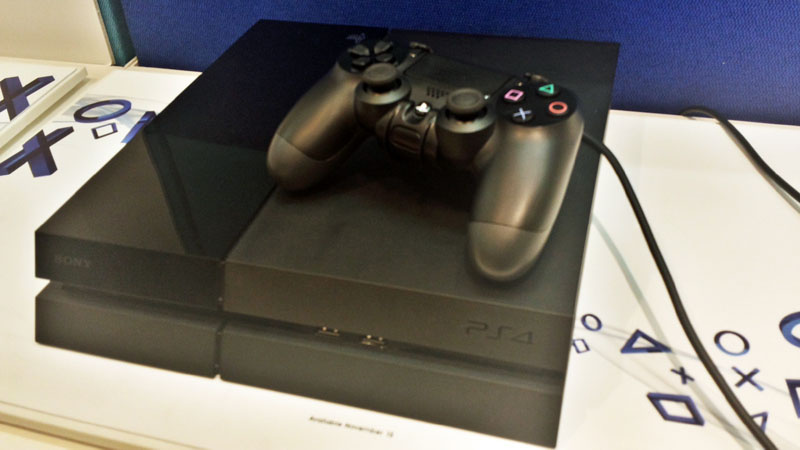
As you can see from the picture above, the Blu-ray eject and power “buttons” are touch sensitive.  It’s cool and maybe I’m just paranoid but I’ve always liked “real” power buttons in case the software completely crashes (or decides to take over the world).  There is a “real” power switch in the back of the unit so I guess it’s safe.

Below the power “button” are 2 LED indicators.  The one on the left is blue and is on when a Blu-ray disk is in the drive.  The one on the right is red when the unit is “off” and green when the unit is “on.”  It blinks when it the PS3 is in the process of powering down.

Under this top area is the lower area shown below.

Front with 2 USB and HD/power LED indicators

Front of unit with 2 USB ports and HD/Wi-Fi LED indicators

You can see the 2 USB 2.0 ports and LED indicators.  The HD indicator LED is yellow and the Wi-Fi is green so that you can tell what’s going on from far away.

Plugging a USB flash drive worked flawlessly and I was able to copy some MP3 files onto the PS3.

For me, the main attraction was the Blu-ray disc player so that I can finally watch Blu-ray movies on my HDTV in full 1080p resolution.  Here, the PS3 delivers the goods and more.  Basically, for the price, you get a Blu-ray player with a free game console.

On this topic, the PS3 also upconverts your old DVDs to 1080p and the image does look better than what comes out of my old DVD player connected as 480i to my HDTV.  Of course, the PS3 also plays CDs so you can get rid of your DVD and CD players from your entertainment center.

Back

Back with AV out, Digital out, HDMI and LAN

The back of the unit (shown above) shows the single HDMI output (no HDMI cable provided) and the LAN plug.  Since my PS3 is far from my computer, I am using the built in 802.11b/g Wi-Fi to connect to my wireless router.  It’s slower but more convenient.

Once I was connected to the Internet, I signed up for the free PlayStation Network membership.  Yes, free.  Did you hear that Microsoft?  Then, I downloaded a new version of the PS3 firmware, and for fun, downloaded HD movie and game trailers, free demo games, and themes for the PS3.  For most downloads, you can do it in the background while you do other things.  The Wi-Fi connection also allows you to access your favorite MP3 music, pictures or videos from any Windows Media Center compatible PC.  More on this in another post.

The proof that the PS3 runs a real OS (and GUI called XMB) is the ability to multi-task.  For example, you can play music and use the Internet browser.  However, there are limitations.  For example, if you try to look at pictures, it will ask to close the browser. Of course, if you start a video, the music will stop automatically.

Dualshock 3 user POV (top), front with mini USB plug (bottom)

Dualshock 3 user POV (top), front with mini USB plug (bottom)

Included with this model is the Dualshock 3 wireless (Bluetooth) controller.  Reports are that the Dualshock 3 has weaker rumble than the older PS2 Dualshock 2 to save battery power because it runs on battery.  However, there’s 2 separate vibrators which allows for “stereo” vibrations in this new controller.  I was able to play for 6 hours without running out of juice so the battery is not that weak.

The Bluetooth connection is great because it’s wireless but you don’t have to worry about distance or direction.  As a matter of fact, you can be so far away from your TV, you can’t even see what’s written on the screen, and it still works.

Now for some small negatives.

One complaint I have is that the controller does not charge (using the included USB cable) when the PS3 is off.  Therefore, either you have to leave your PS3 on, or charge it while you are playing.  Charging it while playing using the included USB cable it not an option because it’s too short.  Alternately, you can buy a controller charger from a 3rd party, or use any USB port on a computer to charge the controller.

Another small complaint is if you store the PS3 sideways (that is flat instead of tower style), the top is round so you really can’t put anything on the unit (e.g. Game controllers, DVD cases, etc).  Yes, the styling is cool but it would be nice to have room there for your stuff.  Maybe they just don’t want you to put your drink on there and spill it.

One other thing I noticed is the browser runs out of memory easily.  It’s nice that you can open up multiple windows and browse several websites simultaneously, but you can quickly run out of memory.  It’s odd that this box can run games faster than most PCs, but runs out of memory browsing myspace pages.

All in all, I’ve been very happy with this game console.  I’ll have more on Blu-ray movie quality in another post but I’ll just say that it’s great.  One thing is for sure.  Between playing next-gen games and watching Blu-ray movies, I don’t think I’m going to have much time to write any reviews.